

Pick the Best Competitor Analysis Tool: 16 Compared (2026)
These 16 competitor analysis tools help you answer different questions, from which keywords a rival ranks for to how often its app is downloaded. Start with the task you need to do today, then check what you can do for free and which limits would make a paid plan worth it.
- SEO: Start with Semrush’s free Domain Overview to inspect a competitor’s search visibility. Try Ahrefs Starter if you mainly need to inspect a competitor’s backlinks, keywords, and top pages.
- Website traffic: Use the Similarweb browser extension for a quick estimate. Use Owler when the question is about company news, funding, or leadership.
- Advertising: Use SpyFu for paid search history. Use Adbeat when you need to study display or native ads and where they appear.
- Sales: Look at Klue if buyer interviews inform your battlecards. Look at Crayon if your team needs to keep those cards current and get updates to reps.
- Monitoring: Start with Visualping for a few specific pages. Consider Competitors App if you also need to follow newsletters and social posts. Use Wappalyzer to check a site’s technology stack.
- Mobile apps: Use Appark to find rivals in the rankings and start tracking them. Use AppMagic for game subgenres, AppTweak for app store optimization, Appfigures for your own app reporting, or Sensor Tower for broader market and audience research.
This guide is for small teams and independent builders choosing their first tool or deciding whether a paid plan is worth it. Appark publishes this guide and is included in the comparison.
16 Competitor Analysis Tools at a Glance
Prices are in USD. Monthly prices assume monthly billing unless an annual commitment is stated. The price column names the plan when it matters to the comparison. Check the vendor’s current pricing before buying.
| Tool | Best for | Free access | Paid entry |
|---|---|---|---|
| Ahrefs | Backlinks and competitor SEO | Site Explorer for verified sites | Starter $29/mo |
| Semrush | Keyword gaps and search research | Limited reports, up to 10/day across core tools | SEO Classic about $140/mo |
| SpyFu | Paid search ad history | Limited searches and results | Basic $39/mo |
| Similarweb | Website traffic and channel mix | Browser extension | Starter $199/mo |
| Owler | Company profiles and news | Community plan with monthly limits | Check current Pro price |
| Adbeat | Display and native ad research | Basic | Standard $249/mo |
| Crayon | Updating sales teams on rivals | Separate Intel Free entry | Request a quote |
| Klue | Battlecards and buyer interviews | Request a demo | Request a quote |
| Visualping | Watching specific pages | 150 checks/mo across up to 5 pages | Personal $14/mo |
| Competitors App | Website, email, and social monitoring | Trial signup | Listed at $19.90 per competitor/mo |
| Wappalyzer | Website technology lookups | 50 lookups/mo | Pro $250/mo |
| Sensor Tower | App markets, advertising, and audiences | Public top charts | Request a quote |
| Appark | Finding, comparing, and tracking rival apps | Rankings, rank comparison, and 1 monitored app | Starter $49/mo (limited-time price) |
| Appfigures | Reporting on your own apps | Starter for up to 5 apps | Connect $9.99/mo |
| AppMagic | Mobile game subgenre research | Public charts | Check current paid access |
| AppTweak | App store optimization and app market research | Market Intelligence Starter | Market Intelligence Explore $7,900/yr |
I compared each tool against a specific task, the data or changes it covers, the free entry point, and the limitation most likely to affect a purchase. The comparison draws on public pricing, product documentation, and the linked examples. Where a vendor uses custom quotes or where published configurations vary, check the exact package before comparing costs. Features listed for a platform can require a different plan from the one shown in the table.
SEO Competitor Analysis Tools
Start with a single competitor page and a question you can act on. A keyword gap shows queries where a rival has visibility you could pursue. A backlink gap identifies sites that link to competitors and might be relevant to you. A content gap shows topics or page types your site could cover. Before adding any of these to your plan, check whether the opportunity matches what your customers are searching for.
Ahrefs
Choose it for inspecting a rival’s backlinks, organic keywords, and top pages. If a competitor article outranks yours, start with its top queries and referring domains. That helps you decide whether to improve the article’s coverage, earn stronger links, or investigate a different search intent.
Free access and limits. Ahrefs Free includes Site Explorer for verified sites. The $29/month Starter plan allows limited research on competitor domains. The $129/month Lite plan adds the dedicated Competitive Analysis tool, larger report limits, and exports. Ahrefs Starter is a reasonable first step if you only need a few domain checks and can work within the credit limit.
Semrush
Choose it for comparing search visibility across domains. Start with free Domain Overview to inspect a competitor. Use Semrush Keyword Gap when you need a side-by-side comparison. If a rival ranks for a relevant query you miss, inspect the pages that rank and decide whether one of your existing pages could serve the same search.
Free access and limits. The free account provides up to 10 reports per day across core tools. SEO Classic starts at about $140/month. Detailed website traffic research and fuller AI visibility reporting have their own toolkits or bundles, so check which package includes your priority report.
SpyFu
Choose it for seeing which paid search terms and ad copy a competitor has used over time. Look for recurring offers or messages you can turn into test ideas. A frequently observed ad gives you a creative to study. Its conversion rate remains unknown.
Free access and limits. SpyFu offers limited free searches, and Basic is $39/month. Check a few known rivals before subscribing to see whether the ad history is useful in your market. For publisher placements or display creatives, evaluate a display ad tool.
Website Traffic and Company Research Tools
Choose the source based on the decision. Website traffic helps you compare visibility and acquisition channels. Company news helps you notice events worth investigating, such as a funding round, a new executive, or an acquisition announcement.
Similarweb
Choose it for estimating traffic and seeing which channels bring visitors to competing websites. Use the free extension to check whether a rival appears to rely more on search, referrals, or another visible channel. Then look at the underlying keywords, referring sites, or campaigns before deciding what to test.
Free access and limits. Web Intelligence Starter is $199 month to month or $125/month billed annually. Verify whether the plan includes the history, geography, and audience overlap you need. Similarweb’s estimates for low-traffic sites may vary more or show as unavailable. If a figure would change your budget decision, compare equivalent periods and market definitions across sources.
Owler
Choose it for following public company news alongside a shortlist of rivals. A confirmed acquisition or leadership change can give you a reason to update a competitor brief or check whether its product positioning has changed.
Free access and limits. Community lets you follow up to five companies, with one company profile, one Daily Snapshot, and one Instant Insight per month. Check the Pro checkout for current billing terms if you need regular updates. Use company announcements or filings to verify a material event before acting on it.
Advertising Intelligence Tools
Decide whether you need search ads, Meta creatives, or publisher placements. Those are different questions. SpyFu covers paid search research. The Meta Ad Library lets you inspect active Meta creatives, and the Google Ads Transparency Center lets you look up ads by advertiser or website. For ongoing display research, consider Adbeat.
Adbeat
Choose it for finding display and native creatives and researching the networks or publishers where they appear. Use a placement or recurring format to build a list of tests for your own campaign. Validate the idea with your own results before changing your spend.
Free access and limits. Adbeat offers Basic for free. Standard is $249/month and Advanced is $399/month. Check the plan comparison if you need alerts or estimated spend. Observed creatives and modeled spend can guide research, while campaign results require separate evidence.
Sales Battlecard Tools
A battlecard is a brief a sales rep can use in a competitive deal. It usually covers how a rival positions itself, common objections, and which claims the rep can support. If only a few deals involve the same rival, start with a shared document and a clear owner. Dedicated software becomes easier to justify when several reps need updates and the information changes regularly.
Crayon
Choose it for turning recurring competitor updates into material your sales team can use. For example, a rival’s pricing-page change might prompt an update to the objection-handling section of a battlecard. Crayon’s sales tools can distribute competitive intelligence through Salesforce and Slack.
Free access and limits. The full platform uses custom pricing. Crayon also offers an Intel Free entry for assembling a competitor list and reviewing online activity. Confirm how the paid quote handles rollout, integrations, and access for your sales team.
Klue
Choose it for connecting battlecards with win-loss research. Klue’s buyer interviews and feedback can help you test whether the reason a deal was lost matches what the sales team believed.
Access and limits. Klue’s public site directs buyers to a demo. Ask which services the quote covers, including recruiting interviewees and delivering research. A few interviews can surface objections worth investigating. Broader conclusions depend on who you heard from and how representative those deals were.
Website and Change Monitoring Tools
Start by picking a change that would lead to a decision. A pricing page might affect your packaging. An onboarding email might suggest a message to test. A new integration on a rival’s site might prompt you to ask customers whether it matters.
Visualping
Choose it for monitoring specific pricing pages, feature lists, or changelogs. Select the relevant part of the page, then use the change record and summary to decide whether the update warrants a closer look.
Free access and limits. Visualping’s free plan includes 150 checks per month across up to five pages. The shortest selectable interval is 60 minutes, but checking all five pages daily uses about the full allowance. Personal starts at $14/month. Check integration availability by plan if your team needs Slack.
Competitors App
Choose it for following multiple channels for the same rival. Website changes, trial emails, newsletters, and social updates can help you see how a competitor communicates a launch across channels. Competitors App also monitors keywords and other marketing activity.
Access and limits. The main site lists $19.90 per competitor per month and offers a trial signup. Because billing scales with the number of rivals, calculate the cost for your shortlist and confirm checkout terms. If the only thing you need is a change alert for one pricing page, a dedicated page monitor is simpler to evaluate.
Wappalyzer
Choose it for identifying detectable technologies behind a website, such as its content management system, ecommerce platform, or analytics tools. Use a lookup to build an integration shortlist or check a lead list for a particular technology.
Free access and limits. A free account includes 50 lookups per month. Pro starts at $250/month. Treat detections as clues about the visible stack. Confirm any important finding before inferring a vendor relationship or a product decision.
For a broader comparison of alerts and monitoring workflows, see the competitor monitoring tools guide.
Mobile App Competitor Analysis Tools
When you’re researching a rival app, start with estimated downloads, estimated store revenue, and chart positions. Compare apps across the same country, store, and period. Estimated store revenue covers paid downloads, in-app purchases, and subscriptions. It excludes ads, ecommerce, and other off-store payments. Use it to compare the scale of store monetization. It cannot tell you the app’s profit.
Sensor Tower for market, advertising, and audience research
Choose it for sizing a category or combining app performance, advertising, and audience information in a larger research project. Ask which datasets, countries, history, and exports the quote includes. You can check chart positions in Sensor Tower’s public top charts before speaking to sales.
Access and limits. Paid access is sales-led. Sensor Tower acquired data.ai, formerly App Annie, in March 2024. If you’re looking for a capability you previously used in data.ai, ask Sensor Tower where it is now available.
Appark for finding, comparing, and tracking rival apps
Choose it for turning a category search into a shortlist you can keep following. Open the App Download & Revenue Rankings and select a market and store using the available filters. Use the estimated downloads and store revenue to shortlist apps, then check their store listings for overlap in audience or use case. The platform covers the App Store and Google Play across 40+ markets.
What Free covers. Use the rankings to see estimated downloads and store revenue. In App Comparison, the free plan lets you compare chart positions for up to three apps. Free includes one month of history for the download, revenue, and growth rankings, with limited filters, and lets you monitor one app. Paid plans add download, store revenue, and revenue per download (RPD) comparisons. You can set up monitoring for events such as chart rank or version changes and enable a daily email digest for matching events.
When to upgrade. Starter adds estimated download, store revenue, and RPD comparisons for up to three apps, three months of history for the download, revenue, and growth rankings, monitoring for up to 10 apps, and exports within plan limits. The Appark pricing page listed Starter at $49/month and Pro at $69/month as limited-time offers November 2026. Pro supports up to 20 apps per comparison.
Appfigures for your own app reporting
Choose it for bringing reporting from your own apps into one place. Appfigures Starter supports up to five apps, and Connect starts at $9.99/month. That’s a starting point if your main job is reviewing performance for apps you already publish.
Limits. Connect lists no tracked competitors. If you need third-party estimates or a named competitor watchlist, confirm which Boost or Market Intelligence configuration covers that job and how many rivals it includes.
AppMagic for mobile game subgenres
Choose it for narrowing a game market to the games you actually compete with. If you’re building a merge game, look at the relevant subgenre before benchmarking against a broad puzzle chart. AppMagic also offers publisher and live operations research for game teams.
Access and limits. You can start with public charts. Confirm the paid access needed for historical views or exports before relying on them. Sensor Tower acquired AppMagic in May 2026 and describes it as its offering for small and midsize businesses.
AppTweak for app store visibility
Choose it for app store optimization (ASO), such as deciding which keywords or listing changes to test. AppTweak also offers a separate Market Intelligence product line if you need download and revenue estimates.
Free access and limits. Market Intelligence Starter includes three seats and App Explorer estimates for the past month and over an app’s lifetime. Explore adds 12 months of history and comparison features, and the USD annual price is $7,900. Check the ASO plans separately if keyword research is your main task.
Example: Choosing rivals for a mobile video editor
For a short-form video editor, I’d shortlist CapCut as a direct competitor and Canva as an adjacent competitor. CapCut’s App Store listing focuses on editing tasks such as keyframing and speed control. Canva’s listing presents video editing as part of a broader design suite. That distinction matters when deciding which app to benchmark for a specific workflow.
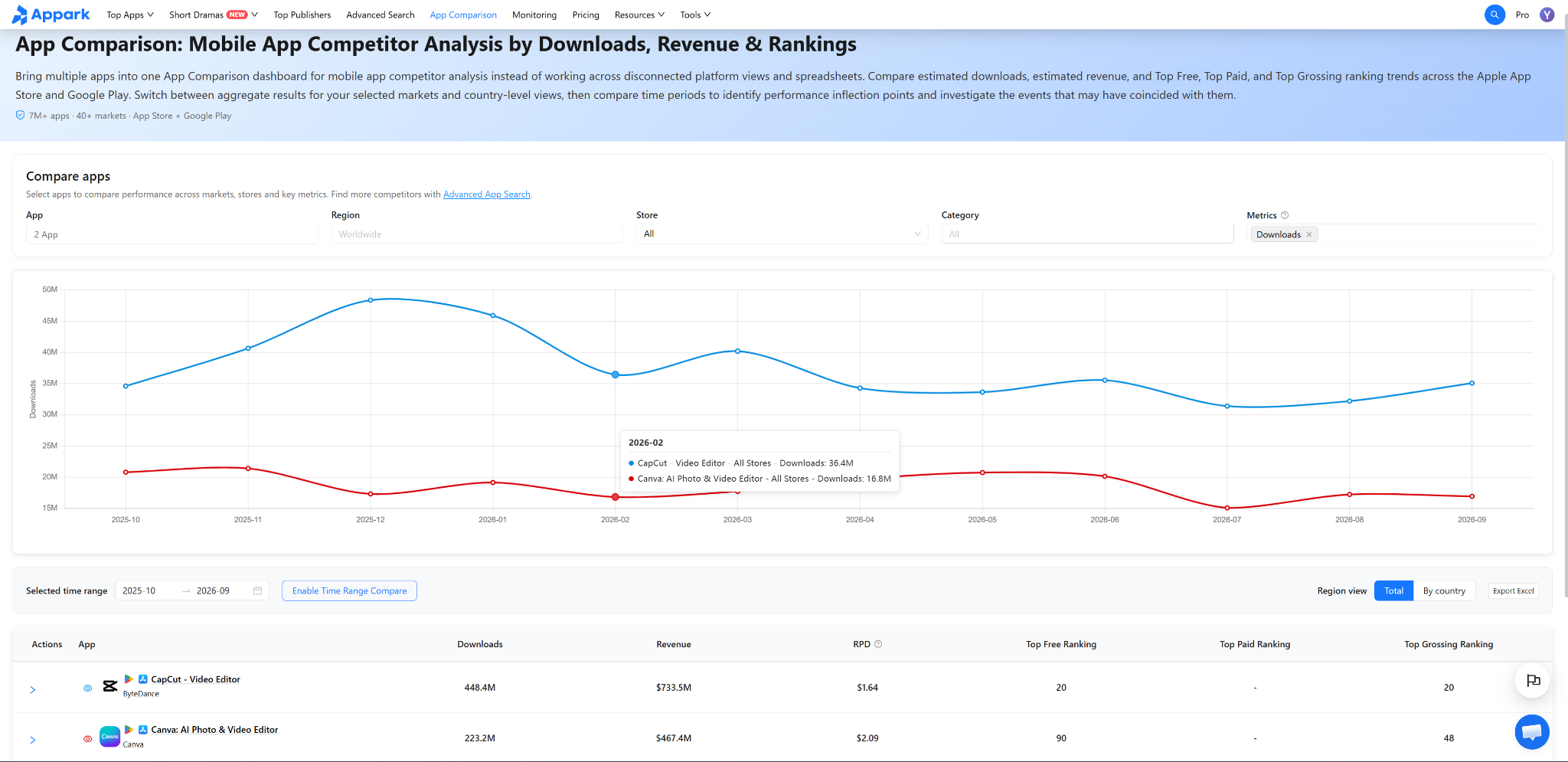
Source: Appark App Comparison. Worldwide covers the markets Appark tracks. Both stores are combined. The chart shows monthly estimated downloads, and the table totals cover October 2025 through September 2026.
Over that period, Appark estimated 448.4 million downloads for CapCut and 223.2 million for Canva. CapCut’s line is higher in every month shown, and its estimated total is about twice Canva’s. These figures cover each app as a whole. They don’t isolate downloads driven by video editing or show how the apps compare in a specific country. To reproduce the view for your own shortlist, compare mobile apps across markets and periods.
With one free monitoring slot, I’d start with CapCut because its core workflow is closer to the product in this example. CapCut’s U.S. App Store release notes mention changes to trimming in version 19.9.0. That gives the team a specific question to test in its own product: can a new user find the trim controls and make a first edit without help? The version note is a separate observation from the download chart.
Free Competitor Analysis Tools You Can Start With
Pick the smallest free option that answers your first question. An open chart, a free account with quotas, and a time-limited trial give you different amounts of room to repeat the analysis.
| I want to… | Start with | What to watch for |
|---|---|---|
| Inspect a competitor’s search visibility | Semrush Domain Overview or SpyFu | Semrush limits free reports. SpyFu limits visible results. |
| Check a website’s traffic | Similarweb browser extension | Low-traffic sites may show incomplete or unavailable estimates. |
| Watch a pricing page | Visualping | Five pages checked daily use about 150 checks/month. |
| Inspect public ad creatives | Meta Ad Library or Google Ads Transparency Center | Use the creatives to form test ideas. Available disclosures vary. |
| Follow company mentions | Google Alerts | Review the results for relevance and verify significant events. |
| Find mobile rivals and see estimated store performance | Appark | See estimates in the rankings. Compare chart positions for up to three apps and monitor one app for free. |
If you’re evaluating a subscription, do the same task on a real competitor before starting a trial. Record the first limit that would change your work, whether that’s history, an export, a second monitored app, or a report you cannot open.
How to Run a Competitor Analysis in 5 Steps
- Name the decision. Write a question specific enough to test, such as “Which U.S. video editors should we benchmark before changing onboarding?” Start with a small shortlist and add a rival when it gives you a distinct comparison.
- Align the data. Use the same country, channel or store, and period for every rival. Record where each number came from and whether it is an estimate. For an app idea, connect these signals to user demand with the app market research guide.
- Investigate one gap. Check a competing search page, a store listing, an ad, or a set of recent reviews. Look for repeated problems across several sources. If a complaint suggests a feature idea, validate it with customers before putting it on the roadmap.
- Monitor changes that could affect the decision. Watch a rival’s pricing page, release notes, or chart positions. Record the event date and the market for any related metrics. An event and a performance change can occur together for several reasons, including seasonality, promotion, and product changes.
- Write one action. Record the evidence, the decision, and who will follow up. For example, “Compare onboarding in the two apps that serve the same customer, then test whether we can get users to their first export in fewer steps.”
Pick one decision you need to make this week and one competitor to research. If you’re looking for an SEO opportunity, start with a keyword gap. If you’re tracking a pricing change, monitor the page that matters. If you’re researching a mobile app, use the App Download & Revenue Rankings to find two or three apps worth comparing.
Frequently Asked Questions
Can I see how many downloads a competitor’s app gets?
Mobile market intelligence tools provide estimated downloads for other publishers’ apps. Choose a country, store, and complete period before comparing. For your own app, use your authorized developer console as the first source for reported performance and check its metric definitions before comparing.
What should I do when two tools disagree on website traffic?
Check whether they cover the same geography, devices, period, and traffic metric. A mismatch may explain some of the difference. If comparable estimates still disagree, record both, lower your confidence, and look for corroborating evidence before committing budget.
When is it worth paying for a competitor analysis tool?
Pay when a verified limit gets in the way of a decision you make regularly. That could be a report you need to export, extra history to check seasonality, or more rivals than your watchlist supports. Compare plans against that specific requirement and confirm the feature at checkout.
What data can I use for competitor analysis?
Useful sources include public app store listings, ad libraries, company announcements, authorized analytics for your own properties, and interviews your team has permission to use. Note the source and what it can establish. For example, a public ad tells you what creative appeared. You need campaign reporting to judge its results.