


7 Best Competitor Monitoring Tools: Free & Paid (2026)
A competitor changes its pricing page, launches a feature, or starts gaining ground on your most valuable search terms. Unless someone checks the right source, your team may not notice until a customer brings it up.
By then, your sales comparison may be out of date, your content team may have missed a useful signal, and you still need to work out what changed. Adding more alerts can make that harder: a busy inbox does not tell you which update deserves a response.
A competitor monitor tool can help—if it tracks the information you need and gives you evidence you can verify. This guide compares seven options for website changes, SEO, social mentions, traffic, and mobile apps, including free plans and their limits. Use the comparison below to find a starting point, then build a workflow around the decisions your team actually makes.
Quick comparison: features, free plans, and pricing
| Tool | Where it fits | Free access | Paid access |
|---|---|---|---|
| Visualping | Website edits, pricing pages, and changelogs | 5 pages and 150 checks/month | Personal from $14/month, or $10/month billed annually; Business costs more |
| Semrush | Search rankings and competitor keyword research | Limited free account; selected plan trials | Paid toolkits and bundles; check the required features |
| Mentionlytics | Social listening and public mentions | 14-day trial | Basic advertised at $49/month billed yearly as a limited-time offer |
| Similarweb | Website traffic and acquisition-channel research | Limited free website checker | Packages vary by product and data access |
| Appark | Mobile app updates, rankings, ratings, and store changes | Basic comparisons of apps, search by app name, and explore basic charts | More monitored apps, longer history, full filters, download and revenue analysis, and exports |
| Klue | Competitive intelligence and sales enablement | Demo-led evaluation | Contact sales |
| Google Alerts | News and new matching web results | Free | No paid subscription required |
If your immediate problem is a changing pricing page, start with Visualping. If competitors are taking visibility in search, look at Semrush. For public conversations, evaluate Mentionlytics; for mobile app activity, look at Appark. Similarweb adds traffic context, while Klue helps teams organize and distribute competitive knowledge.
Prices and plan details were reviewed on October 10, 2026. Annual prices are monthly equivalents paid on an annual basis. A free trial and an ongoing free plan offer different access; check the official links in each section before purchasing.
What is a competitor monitor tool?
A competitor monitor tool tracks selected information about rival businesses over time. It may detect a webpage change, find a new mention, track search positions, or provide updated estimates for regular review.
Monitoring differs from a one-off analysis. Comparing three pricing pages tells you what those companies charge today. Monitoring the pages helps you notice when the offer changes.
It is also worth separating alerts from research data. An alert says something changed; a research platform gives you context to investigate. Some products do both, but a useful traffic dashboard should not be mistaken for a tool that will notify you whenever a rival edits its homepage.
That distinction prevents a common buying mistake: subscribing to a capable platform that does not solve the task you had in mind.
Which competitor changes are worth tracking?
You do not need to collect every public update. Start with changes that could affect how customers discover, compare, or choose your business.
Pricing and messaging changes. Monitor important pricing sections, offers, and product claims. When a displayed price falls, check the billing commitment and included features before calling it a price cut.
Product updates and app store listings. Follow changelogs, release notes, and relevant store pages. A new integration or redesigned listing may be worth investigating, but public updates do not reveal an entire roadmap.
Search rankings and competitor content. Track the terms that matter to customer acquisition. A rival moving ahead on a high-intent keyword is usually more actionable than a large increase in unrelated informational traffic.
What customers say about competitors. Look for recurring praise, objections, and complaints across accessible public sources. Read examples behind sentiment charts: a brand-name mention may be irrelevant, and a negative post may not represent a wider problem.
Website traffic trends. Review acquisition channels across consistent periods. Use traffic estimates to identify questions worth investigating, rather than treating them as a competitor's internal analytics.
App rankings and estimated performance. When rivals compete on mobile, store changes and app trends provide a different view. Keep the country, store, metric, and period consistent; a US App Store position is not interchangeable with a worldwide download estimate.
7 competitor monitoring tools compared
Visualping — Best for website and pricing-page changes
Visualping watches selected webpages and highlights edits. Alerts include a source URL, screenshot, and AI summary, making pricing pages and changelogs useful starting points.
For competitor website monitoring, select the section you care about. Tracking an entire homepage may introduce noise from rotating content; a focused pricing section makes review more manageable.
A real example appears in Visualping's published Jotform comparison. Two captures dated July 11 and July 13 show different promotional messaging on Jotform's pricing page. This is a vendor-published example of a detected change, not evidence that the promotion increased sales.
The next step is practical: verify the offer and update the relevant sales comparison. You do not need a conclusion about revenue to make that information useful.
Pricing: the official plan comparison lists 5 pages and 150 monthly checks on Free. Personal starts at $14/month, or $10/month billed annually. Business starts at $140/month, or $100/month billed annually.
Watch out for: check allowances, irrelevant page changes, and the distinction between detecting an edit and understanding its business impact.
Semrush — Best for search rankings and keyword competition
Semrush Position Tracking supports recurring keyword monitoring alongside competitor research. It fits teams whose acquisition depends on search visibility.
Choose a manageable set of commercially relevant terms. When a rival improves across those terms, inspect its landing pages and the search results before adding more content to your own site.
The useful distinction is between a keyword gap and an opportunity. A competitor may rank for thousands of phrases that your customers will never use. Prioritize searches relevant to your offer and the stage at which people compare solutions.
Pricing: Semrush offers limited free access and selected plan trials. Its pricing page separates toolkits and bundles. Check tracked-keyword limits, history, and whether AI visibility requires the package you are considering.
Watch out for: paying for broader research capabilities when you only need a few webpage alerts. Ranking changes also do not establish a competitor's conversion rate.
Mentionlytics — Best for social listening and public mentions
Mentionlytics monitors web and social mentions, with sentiment and share-of-voice analysis. It helps when the question is what customers and other audiences say about rivals.
Begin with distinctive brand and product names, then refine the terms to remove irrelevant results. A recurring onboarding complaint is more useful than an unexplained rise in mention volume: it gives you a specific issue to investigate in your own customer journey.
Use automated sentiment to organize the material, then read representative posts. Sarcasm, ambiguous names, and unusual context can undermine the apparent pattern.
Pricing: a 14-day trial is available. The official pricing page advertises Basic at $49/month billed yearly as a limited-time offer. Review keyword rules, monthly mentions, profile limits, and add-ons.
Watch out for: confusing public attention with commercial success. Social media competitor monitoring reveals conversations; it does not reveal revenue or the complete customer base.
Similarweb — Best for website traffic and channel research
Similarweb's website traffic checker provides traffic and acquisition-channel information. It is useful for investigating how competitors attract visits over time.
Suppose a rival appears to be growing. Channel data helps you decide where to look next: a referring website, a set of search pages, or another acquisition source. That is more focused than assuming every increase comes from a better product.
Compare equivalent periods and market scopes. Review Similarweb's data methodology to understand how its estimates are generated, and avoid overinterpreting small differences when coverage is limited.
Similarweb also has a separate App Intelligence product. Evaluate that product directly if app usage or mobile market research is your main requirement.
Pricing: the website checker offers limited free access. Paid packages vary; consult Similarweb's official plans for the product and history you need.
Watch out for: expecting a traffic research platform to provide direct notifications about every pricing-page edit.
Appark — Best for mobile app changes and competitor trends
Appark tracks supported App Store and Google Play changes. Six configurable event types cover version updates, ranking changes, rating changes, app transfers, price changes, and store availability changes.
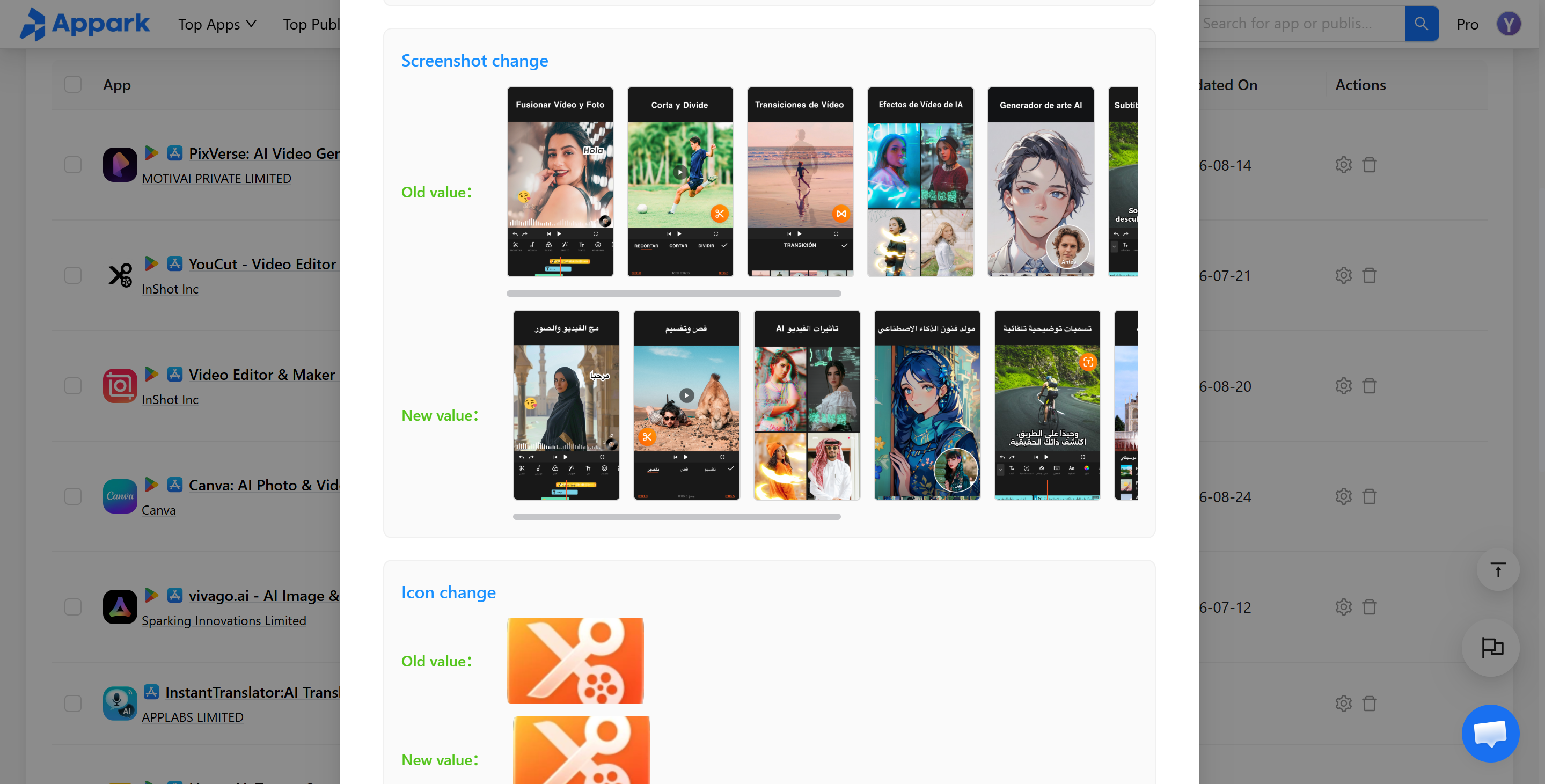
Supported listing content can be reviewed through previous and current values. A Daily Email Digest summarizes matching detected activity; it is not an instant notification, and no empty digest is sent when nothing matches your settings.
To investigate a change further, use App Comparison to review available ranking and estimated performance trends across consistent markets and periods.
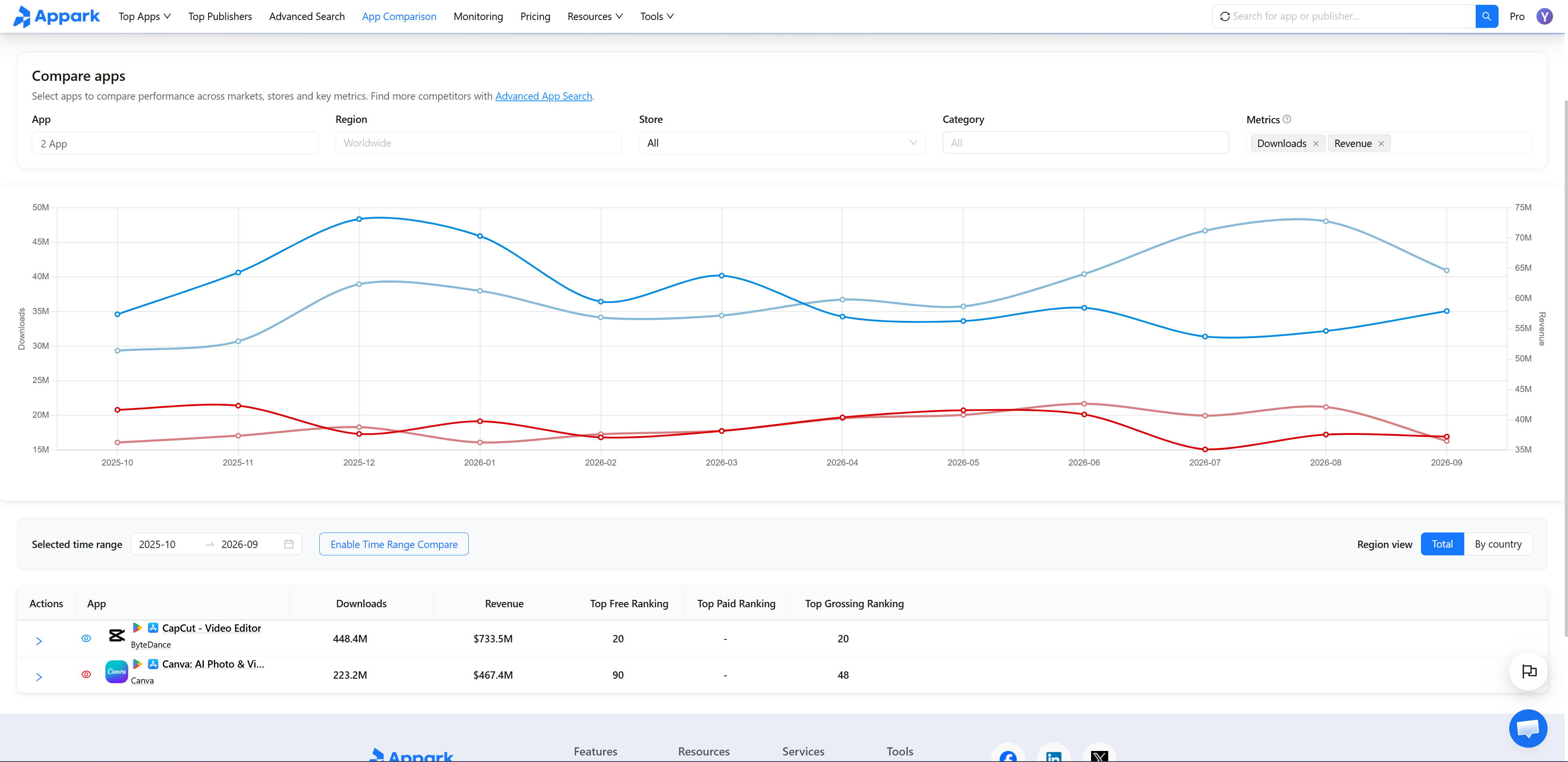
Pricing: Free supports 1 monitored app and basic comparison for up to 3 apps. Paid monitoring limits are 10 on Starter, 50 on Pro, and 200 on Max. Download and revenue analysis requires paid access. See Appark's current plan comparison.
Watch out for: metric scope. Estimated Store Revenue excludes advertising and off-store revenue. Price-change events concern visible upfront app prices, not every subscription or in-app purchase price. These distinctions matter when evaluating how a competing app makes money.
Klue — Best for competitive intelligence and sales enablement
Klue organizes competitive intelligence and win/loss insights for teams that need shared guidance in sales conversations. Battlecards help turn information into material colleagues can use.
This solves a different problem from watching a pricing page. A marketing team may already know that a rival has changed its offer, while salespeople continue using an old comparison. Maintaining and distributing the answer becomes the priority.
A platform cannot decide your positioning for you. Someone still needs to validate evidence, maintain competitive content, and remove outdated claims.
Pricing: evaluation is demo-led; contact Klue for scope and pricing. Confirm which collection, distribution, and win/loss capabilities are included.
Watch out for: adopting a larger workflow before you need it. If one person reviews three competitor websites each week, a focused monitor may be a more proportionate starting point.
Google Alerts — Best free starting point for news monitoring
Google Alerts emails you when Google finds new search results matching a topic. Google's setup instructions cover frequency, source types, language, and region.
Use distinctive competitor and product names to discover coverage and announcements. Refine noisy queries before creating more alerts.
Its limits matter. A silent webpage edit may never become a useful new search result, and Google Alerts is not comprehensive social listening. Use a direct page monitor when you need to watch a particular pricing section.
Pricing: free.
Watch out for: treating a quiet inbox as evidence that competitors have done nothing. It only means the service has not delivered a matching result.
How to choose a competitor monitoring tool
What do you need to track? Finish this sentence: “When a competitor changes ___, we need to decide ___.” If you cannot name the decision, the monitor may be collecting information nobody will use.
What does the required plan actually cost? Check the feature you need, not just the lowest subscription price. Include the relevant page, keyword, mention, competitor, user, and history limits.
How quickly do you need to know? A short promotion may warrant frequent checks. A monthly traffic trend generally needs a longer comparison. Detection frequency and email delivery frequency are different.
Can you verify the finding? Look for source URLs, timestamps, previous values, screenshots, or underlying posts. An AI summary helps with review, but you should still be able to inspect the evidence behind an important claim.
The following combinations are starting points, not tested performance rankings:
| Your situation | A reasonable starting setup | What it helps you answer |
|---|---|---|
| Small SaaS team | Webpage monitoring plus news alerts | Did pricing, product messaging, or public announcements change? |
| Business reliant on organic search | Search tracking plus relevant page monitoring | Where are rivals gaining visibility, and what should we inspect? |
| Mobile app team | Appark plus relevant website monitoring | What changed in the stores and on competitors' websites? |
| Social or communications team | Social listening plus source verification | Which conversations deserve research or a response? |
| Larger sales organization | Competitive intelligence platform plus relevant data sources | How do we keep shared sales guidance accurate? |
Start with the gap that repeatedly affects your work. Add another category when it answers a question your current setup cannot.
How to turn competitor updates into decisions
Step 1: Pick the competitors that matter
Choose direct rivals that serve similar customers. Add a small number of plausible substitutes rather than every company in the category.
Record the relevant website, product pages, public accounts, and app listings. This keeps a product, publisher, and parent company from being confused during later analysis.
Step 2: Choose what to track and where
Assign each question to the appropriate source. Pricing-page monitoring, search tracking, social listening, and app monitoring cover different information.
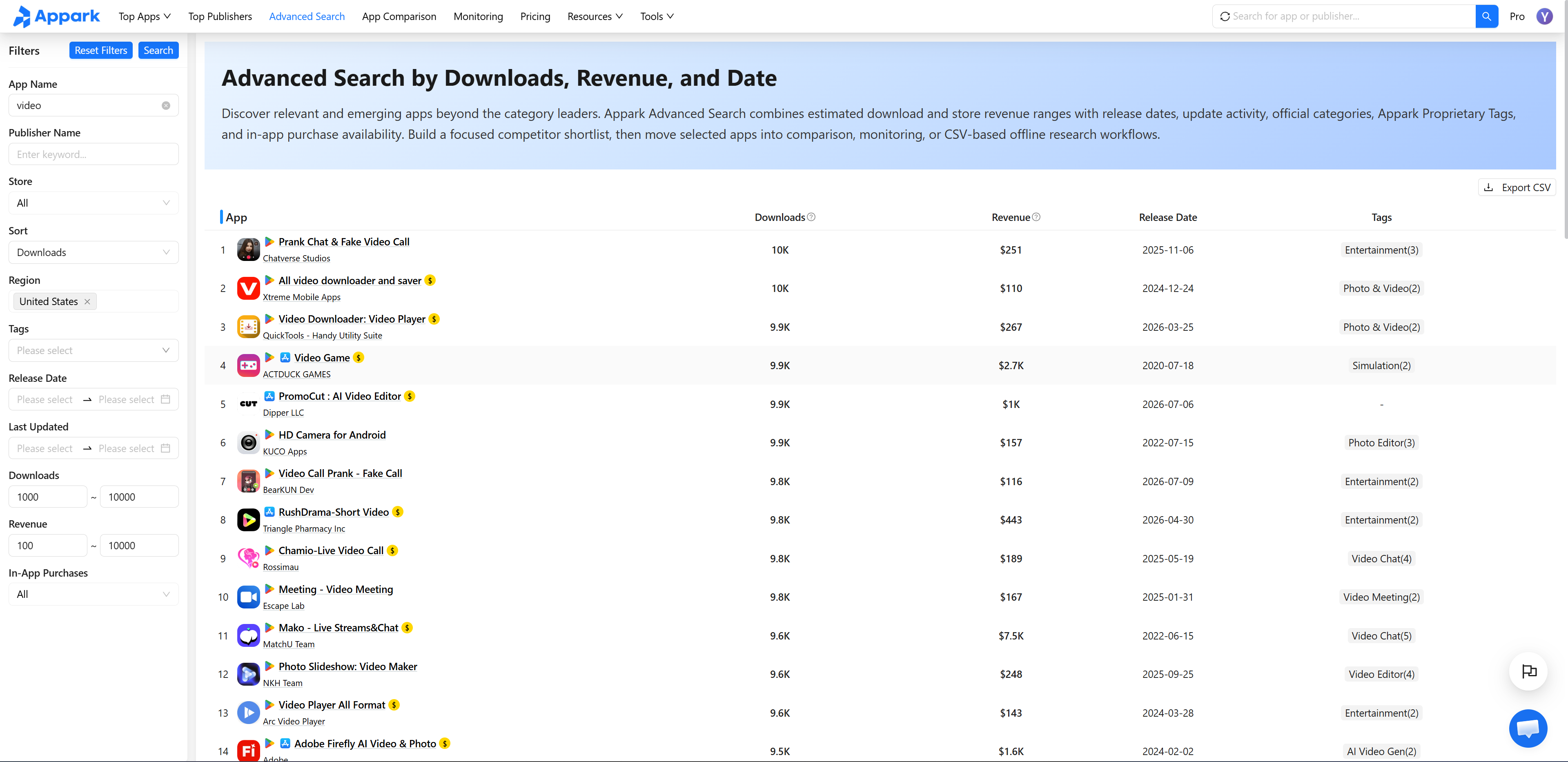
For an app team, Advanced Search can help identify additional candidates using supported market, category, and other filters. Use available filters to narrow the research, then confirm the apps serve a comparable audience.
Step 3: Decide which changes need a response
Define a review rule before notifications arrive. A new plan tier could prompt a sales-page update; repeated search gains could prompt a landing-page review.
Keep routine activity in a scheduled review. Escalate changes when there is a clear reason someone needs to act sooner.
Step 4: Verify what changed
Open the source and check the affected product, market, and date. For pricing, confirm whether the offer is temporary and whether it requires annual billing.
When an app update coincides with a ranking improvement, investigate other explanations too. Advertising, store featuring, seasonal demand, and changes elsewhere in the category could contribute. A timeline gives you a useful research question, not proof of causation.
Step 5: Assign an action and a follow-up date
A short decision log is often enough:
| Finding | What to verify | Possible action |
|---|---|---|
| New promotion on a pricing page | Duration, billing term, included features | Update the relevant sales comparison |
| Repeated gains on important keywords | Landing pages, market, and search intent | Review the affected content |
| Similar complaints from several users | Original posts and whether the pattern persists | Investigate the same friction in your product |
| Detected store listing change | Previous/current content and market | Review positioning and subsequent trends |
Give the action an owner and a review date. If no action is needed, record why. That prevents the same unimportant update from becoming a fresh discussion every week.
Frequently asked questions
How do I choose a competitor monitor tool for a small business?
Start with the information that affects your decisions: pricing pages, search visibility, public mentions, or app store activity. Choose a tool that covers those sources and lets you inspect the evidence behind a change. A small watchlist with a clear review routine is usually more useful than collecting alerts nobody acts on.
Can I monitor competitors for free?
Yes, depending on what you need to track. Google Alerts offers a free starting point for news. For mobile apps, Appark's Free plan includes monitoring for one app, basic comparison for up to three apps, name-based search, and basic charts with limited filters. Check whether the free access is ongoing or a time-limited trial, and whether it includes your required metrics.
How can I track competitor app updates and listing changes?
Look for a tool that records when a change was detected and preserves the previous content. Appark's app monitoring, for example, lets you review supported version and store changes, including previous and current descriptions, icons, or screenshots. Those records help you identify a specific change worth investigating, rather than relying on memory.
Can I receive automatic competitor monitoring alerts?
Many tools offer email alerts, scheduled digests, or integrations. Check which events trigger a notification and how frequently the source is checked. For routine review, a daily summary may be sufficient; a short promotion may require more frequent checks. Delivery timing and detection frequency are separate settings to evaluate.
Can I compare competitor app downloads and revenue?
Several app intelligence platforms provide estimates. Access varies by plan, and basic comparison may not include download or revenue metrics. Use the same store, market, period, and metric definition across apps. Check the revenue scope, especially for products earning money through advertising or off-store payments, and use trends to guide further research.
How often should I review competitors?
Match the schedule to the decision. Weekly reviews can work for product updates and routine listing changes, while market trends benefit from comparisons across longer periods. Review sooner when a verified change affects an active campaign or release. Give each important finding an owner and a next step.
How we selected these tools
This guide compares seven distinct jobs: webpage changes, search visibility, public mentions, traffic research, mobile app monitoring, sales enablement, and news discovery.
We reviewed publicly documented capabilities, access models, pricing structures, and limitations using the official pages linked throughout the article. The latest review date is October 10, 2026. The Appark team publishes this guide and includes its own product; more background is available on About Appark.
The published example is attributed where it appears. A vendor's published case demonstrates a particular workflow; it is not an independent benchmark of every platform.
Choose the tool that answers your next competitive question, and decide who will act on the findings. For teams competing on mobile, create a Monitoring List in Appark, configure the relevant events, and enable the Daily Email Digest. Expand the research when a detected change gives you a reason to investigate.