
Appark’s mobile app publisher rankings combine estimated downloads and store revenue across publishers’ included apps. Use them to identify relevant publishers in a target market, review their app portfolios, and select individual apps for comparison or ongoing monitoring.
How to Use Publisher Rankings
1. Define the publisher and market scope
Select a complete calendar month in the left panel, then set Publisher Headquarters and Country/Region.
To research Chinese publishers in the United States, select China for Publisher Headquarters and the United States for Country/Region. To research publishers across all available headquarters in the US market, leave Publisher Headquarters unrestricted and select the United States.
These settings define which publishers qualify and which market’s estimated performance determines their ranking.
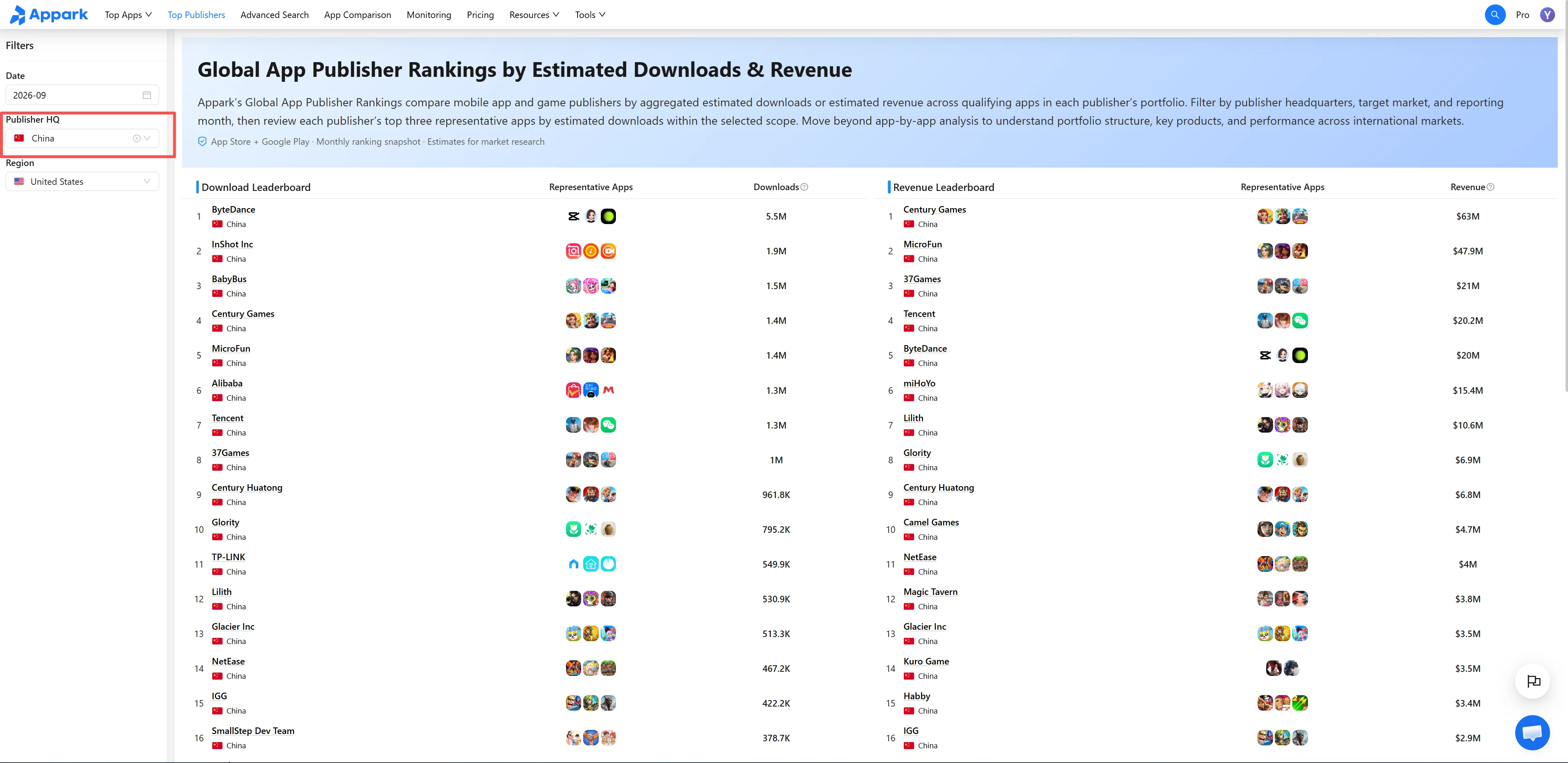
Figure 1: Define publisher and market scope
2. Compare the downloads and revenue rankings
Start with the Publisher Downloads Ranking to identify publishers with substantial estimated download volume. Use the Publisher Revenue Ranking to find those with substantial estimated store revenue.
The two rankings are sorted independently. After identifying a publisher, locate it in the other ranking to compare its position. Publishers appearing on the same horizontal row are not necessarily the same.
Use Representative Apps to recognize a publisher’s products. Hover over an icon to view the app name, or select it to open App Details. These apps are selected by global downloads, so they do not directly show revenue contribution in your selected market.
3. Open Publisher Details and study the app portfolio
Select a publisher name to open Publisher Details. Review the available download and revenue distribution by market, then browse its available app portfolio.
In the app list, select Previous Calendar Month to review app-level Estimated Downloads and Estimated Store Revenue. This refers to the previous complete calendar month, not a rolling 30-day period.
Look for apps with substantial download volume, higher estimated store revenue, or relevance to your research. Narrow the list using keywords, Tags, or store filters where needed.
Look beyond the three Representative Apps. Review app names, Tags, First Release Dates, and estimated performance across the available portfolio to identify products worth investigating.
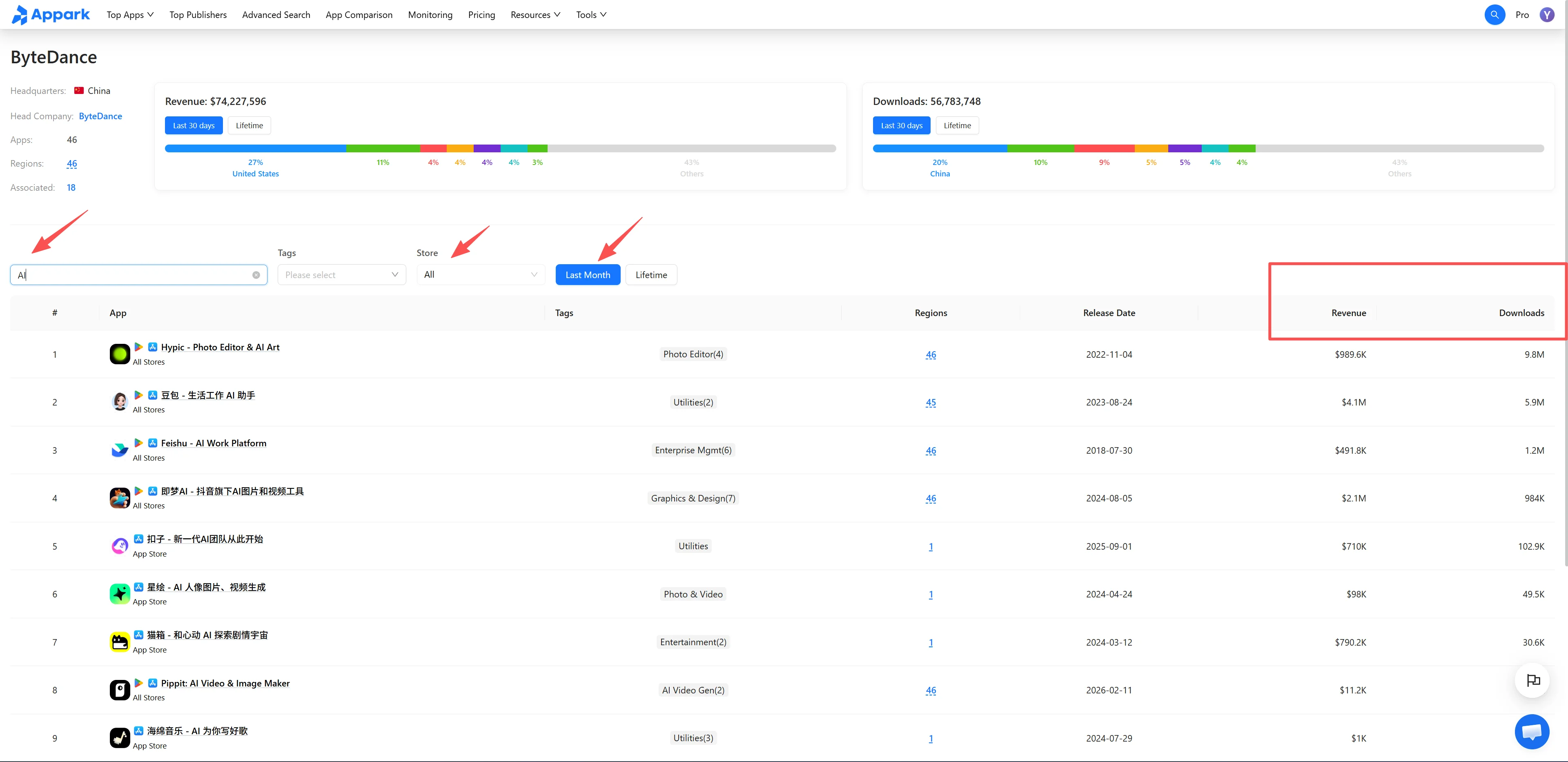
Figure 2: Study app portfolio
4. Select individual apps for comparison or monitoring
Open a relevant app’s App Details to review its features, version updates, and store listing information.
Add selected apps to App Comparison to examine estimated download and store-revenue trends using consistent market and time settings. A performance change following an update does not establish that the update caused it.
For ongoing tracking of version or store listing changes, add individual apps to the Monitoring List. Both features operate on individual apps; adding a publisher’s entire portfolio is not a single action.
Metrics and Ranking Rules
Downloads, store revenue, and Representative Apps
| Metric | Definition |
|---|---|
| Estimated Downloads | Combined estimated downloads of the publisher’s included apps in the selected calendar month and Country/Region, across App Store and Google Play. The Publisher Downloads Ranking is sorted by this total in descending order. |
| Estimated Store Revenue | Combined estimated store revenue of the publisher’s included apps for the same period and market, across App Store and Google Play. The Publisher Revenue Ranking is sorted by this total in descending order. Advertising, e-commerce, and other Off-Store Revenue are excluded. This metric does not represent profit. |
| Representative Apps | Up to three apps selected by global downloads and recalculated at the beginning of each month. The same selection appears in both rankings and does not change with Country/Region. |
Publisher Headquarters versus Country/Region
Publisher Headquarters determines which publishers appear. Country/Region determines where their estimated downloads and store revenue are measured. Selecting the United States measures included apps’ US performance, not their global totals.
Representative Apps remain based on global downloads. They are not necessarily the publisher’s top-revenue apps, and an important revenue-generating app in the selected market may be absent from the three icons.
How to Use the Data for Publisher Research
Build a publisher shortlist. Identify publishers with notable estimated scale in your target market, then review whether their products are relevant to your research.
Examine portfolio concentration. Compare included apps within the same reporting scope to see whether estimated performance is concentrated in a few products or spread across several. This does not establish profitability, app ownership, or whether products were developed internally or published for third parties.
Find growth leads. Publisher Rankings show estimated scale. For individual apps with notable Absolute Growth or Growth Rate, use Downloads & Revenue Growth Rankings, then return to Publisher Details to investigate related products.