
Appark’s app pre-order and pre-registration rankings bring together App Store expected release dates and Google Play pre-registration updates. Find upcoming mobile apps and games, review their store positioning, and monitor selected products through release.
App Store apps use Pre-Order; Google Play apps use Pre-Registration. Each list has its own date fields and sorting rules.
How to Find Upcoming Competitors
1. Select a Target Market and Category
Choose a Country or Region and Category in the left panel to find relevant upcoming apps. To find a specific product or publisher, search by app name or Publisher Name.
For example, if you plan to release a game in Japan, select Japan and the relevant game category. Review similar games available for pre-order or pre-registration there and build a research shortlist.
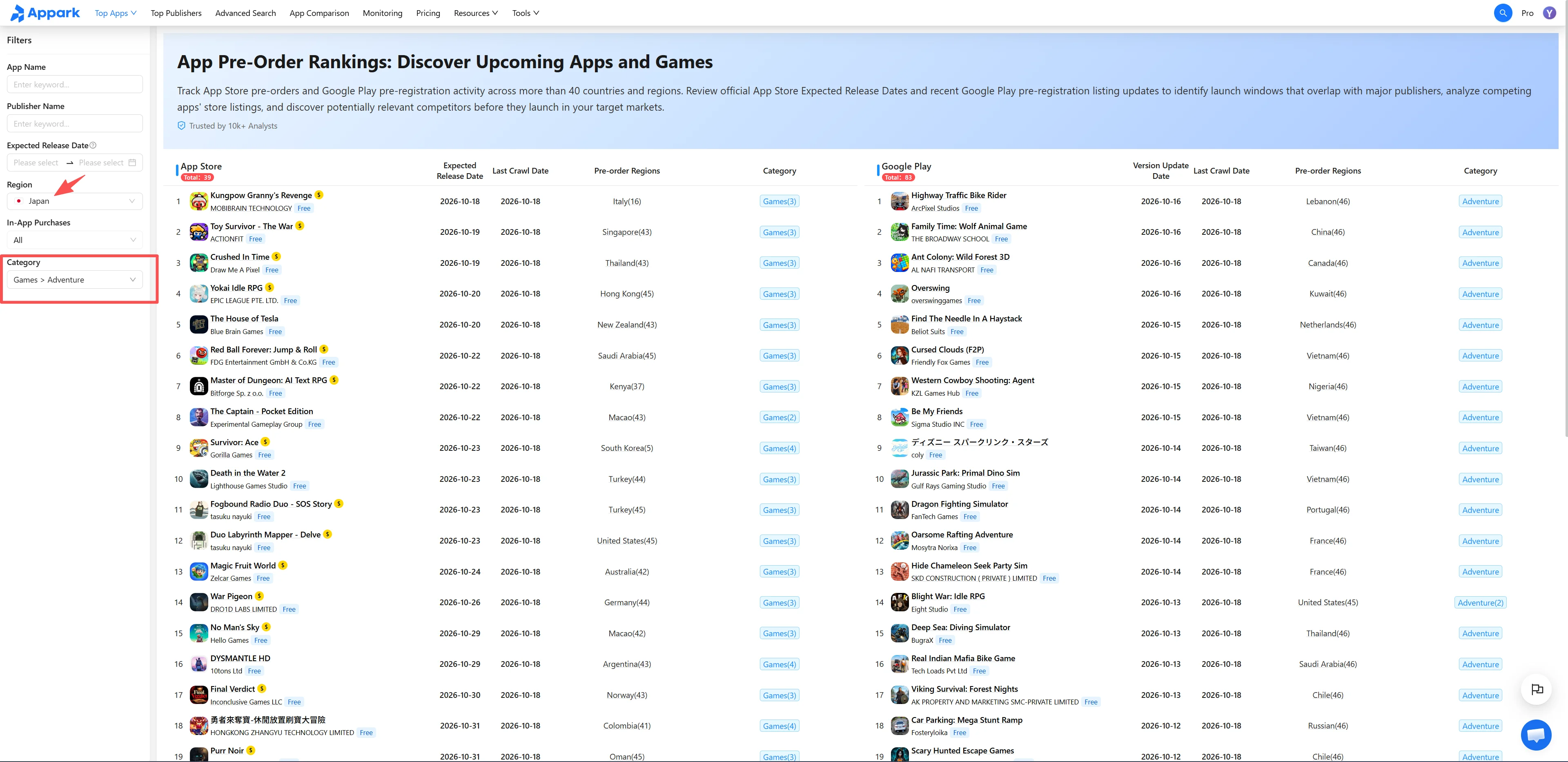
Figure 1: Select target market
2. Review Available Markets and Dates
In the App Store list, review Expected Release Dates. Use the Pre-Order Date filter to narrow the list to a specific period.
In the Google Play list, review recently updated pre-registration apps relevant to your product, then open their details to learn more. Last Updated is not a release schedule.
Select Available Markets to view all countries or regions where pre-order or pre-registration is open. Confirm that your target market is included, then prioritize apps based on product relevance, market availability, and any applicable App Store release dates.
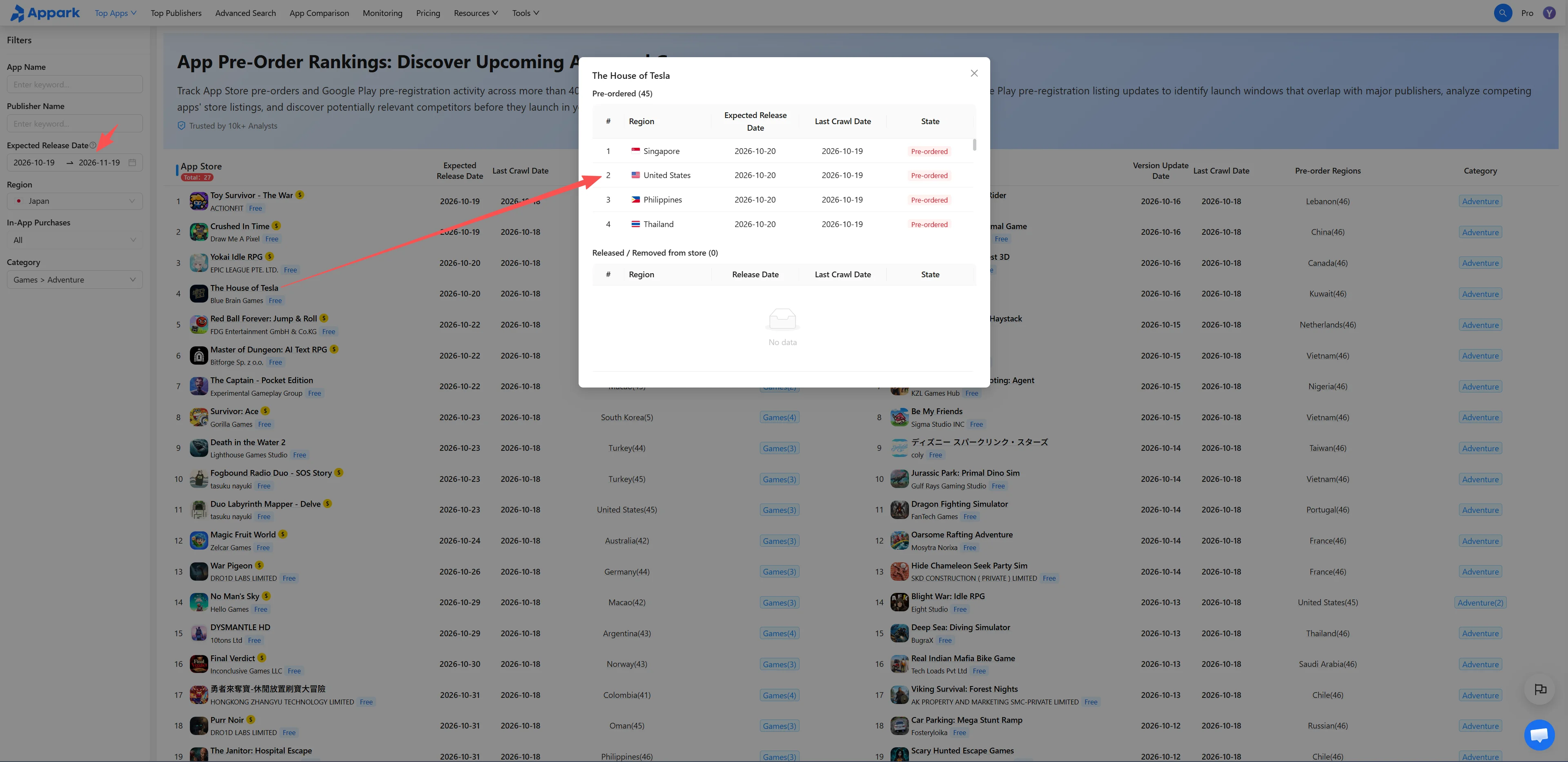
Figure 2: Review markets and dates
3. Analyze Product Positioning and Store Messaging
Select an app name to open App Details. Review its Store Screenshots, App Title and Description, focusing on three questions:
- Who is it for? Identify the intended users and use cases.
- What does it emphasize? Check which features or gameplay elements appear in the first few screenshots.
- How does it differ? Note overlapping selling points and needs your product does not address.
Open several upcoming apps and established products separately to compare their Store Listing Assets and messaging. Use the findings to identify changes worth considering for your positioning or store listing.
4. Add Selected Apps to Monitoring
From App Details, select Add to Monitoring. Open the Monitoring List to review store listing changes and detected release events, where available.
After you enable email summaries, matching events appear in the following day’s Daily Email Digest. No email is sent when no event is detected.
After release, review any available chart data. Once monthly data becomes available, use Downloads & Revenue Rankings to examine Estimated Downloads and Estimated Store Revenue.
These figures are estimates. Estimated Store Revenue does not represent advertising revenue, total business revenue, or profit.
Fields and Ranking Rules
Date and Market Definitions
| Field | Definition |
|---|---|
| App Store Expected Release Date | The expected release date published by the App Store. If dates differ across markets where pre-order remains open, the earliest date is displayed. It is not guaranteed and does not apply to every market. |
| Google Play Last Updated Date | The update date supplied by Google Play for the pre-registration listing. Google Play does not provide an official expected release date in this feature. This field is not a release date or countdown. |
| Available Markets | Countries or regions where the app is currently Available for Pre-Order or Available for Pre-Registration. The number in parentheses includes the displayed market. Select the field to view all markets. |
| Last Collected Date | The most recent date Appark collected information for the app. It is not the app’s update date, expected or actual release date, or the date pre-registration began. |
For example, Australia (16) means pre-order or pre-registration is open in 16 markets, including Australia.
If an App Store app has expected release dates of October 20 and October 25 in two markets where pre-order remains open, the list displays October 20. This does not mean both markets will release the app that day.
Store-Specific Sorting and Filtering
- App Store: Sorted by the displayed Expected Release Date, earliest first.
- Google Play: Sorted by Last Updated, most recent first.
- Pre-Order Date filter: Applies only to App Store pre-order apps and does not affect the Google Play list.
List position does not indicate popularity or commercial potential.
Market-Specific Release Status
An app may already be released in one market while remaining available for pre-order or pre-registration elsewhere.
After release in a market, the app is removed from that market’s list during a subsequent data update. It remains listed in other markets where pre-order or pre-registration is still open. Inclusion therefore does not mean an app is unreleased worldwide.
Data Source and Update Frequency
The rankings use publicly available App Store and Google Play pre-order and pre-registration information and are updated daily. Reservation and pre-registration counts are not included, and neither list is ranked by reservation volume or popularity.
How to Use Pre-Release Information
Use release schedules as planning references. Review related products expected during your planned launch or promotion period. App Store Expected Release Dates may change and do not establish a final release date for every market.
Research product differences before launch. Compare how upcoming products explain features, present gameplay, and communicate selling points. Pre-order or pre-registration status alone does not establish market demand or predict future performance.
Refine your monitoring shortlist. A recent Google Play update is a reason to review a product, but it does not prove that release is approaching or marketing activity has increased. Reassess your shortlist using monitoring records and available post-launch data.