
Use Appark’s app download and revenue rankings to see which apps lead your target market and which are growing. Filter by country or region, store, category, and tags to find relevant competitors, understand their relative scale, and review their longer-term performance.
Open Downloads & Revenue Rankings →
How to Use Downloads & Revenue Rankings
1. Set the Research Scope
In the left panel, choose a reporting period and end month, then select a country or region and a store. Choose Global for a worldwide view, App Store or Google Play to focus on one platform, or All Stores to combine the two.
2. Filter Similar Apps
Use Category or Tags to narrow the results to similar products. When viewing a single store, you can use that store’s official categories. Tags let you focus on more specific segments, such as AI chat assistants or AI image generation.
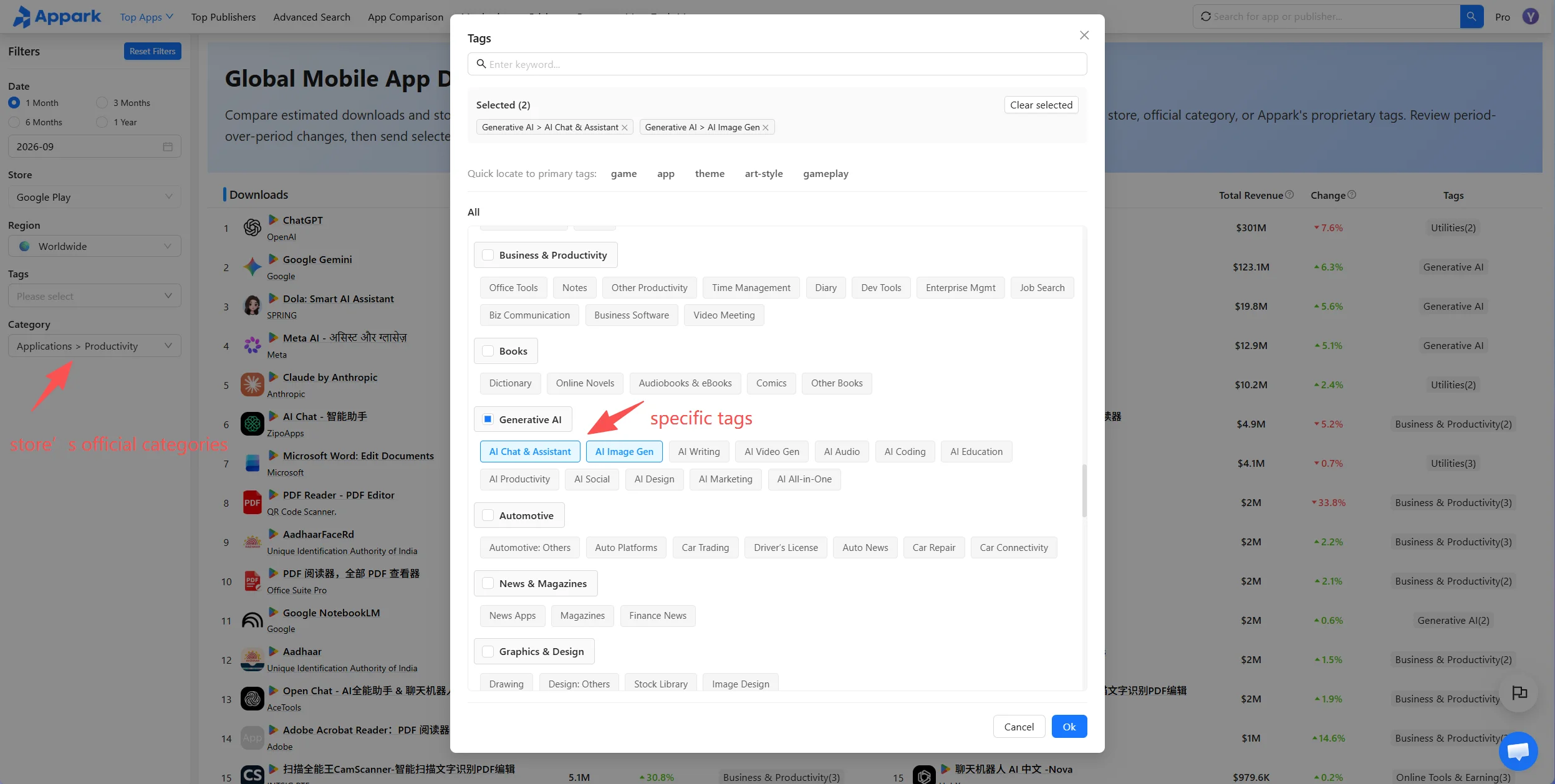
Figure 1: Filter similar apps
3. Review App and Publisher Details
Review both rankings within your selected scope. Click an app name to open App Details for release notes, changes to store listing images, and keyword information. Click a publisher name to open Publisher Details for its published apps across both stores and estimated store revenue. Visit Publisher Rankings to research leading publishers in the category.
4. Select Apps for Comparison or Monitoring
Click the blank area of an app’s result row to select it. You can select multiple apps, then use the bottom action bar to add them to App Comparison or the Monitoring List. App Comparison shows historical trends across apps. Once an app is added to the Monitoring List, you can track version updates, ranking changes, and other events. If any monitoring events occur, an email summary is sent the next day. No email is sent if there are no events.
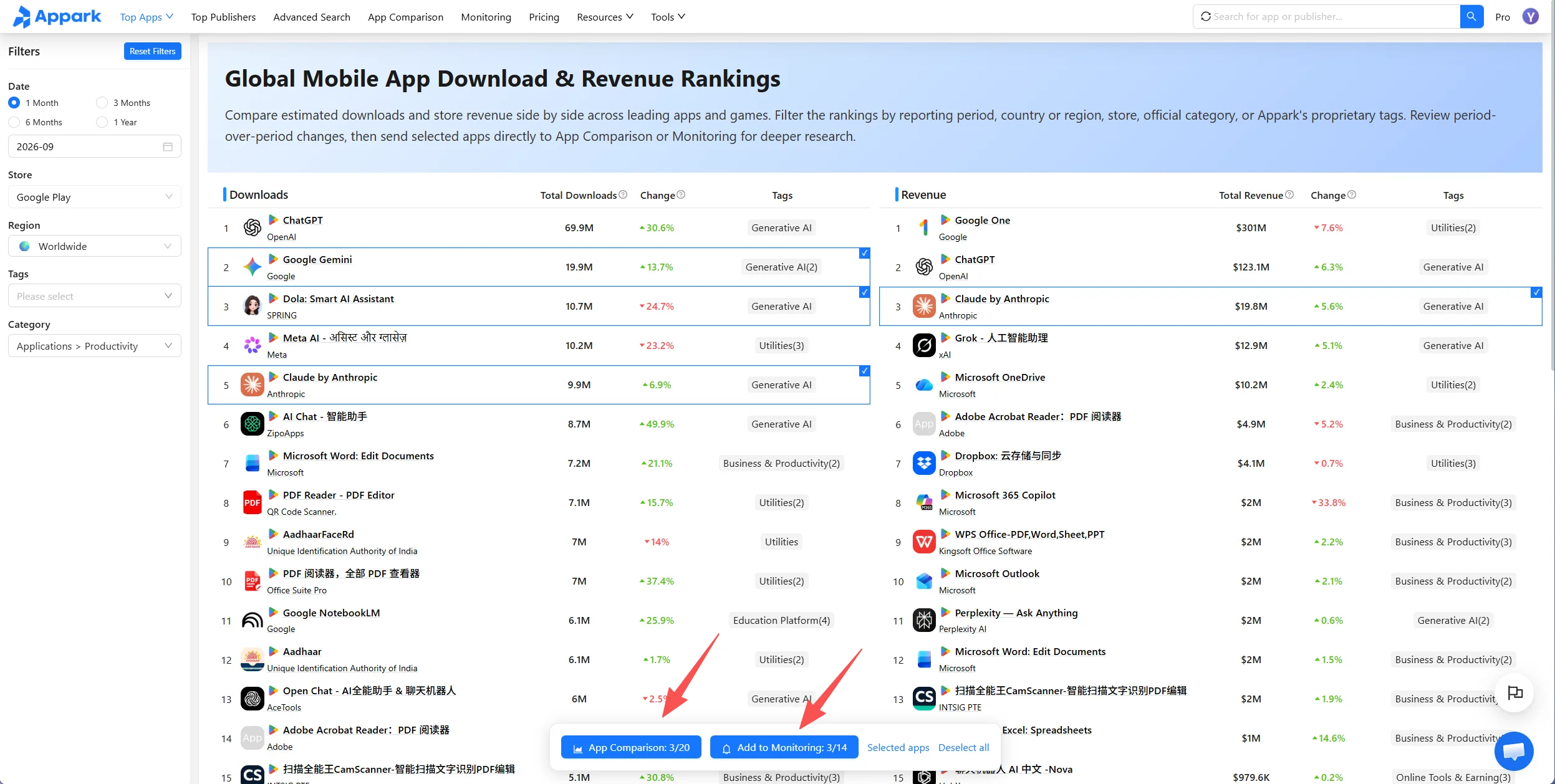
Figure 2: Select apps for comparison or monitoring
Metrics and Ranking Rules
What Do the Metrics Mean?
| Metric | Meaning |
|---|---|
| Estimated Downloads | Cumulative estimated downloads within the selected Reporting Period, countries or regions, and store scope. |
| Estimated Store Revenue | Cumulative estimated revenue processed through the selected app stores within the same scope. Indicates relative scale, not total business revenue or profit. |
| Period-over-Period Change | Percentage increase or decrease compared with the immediately preceding period of equal length. For a one-month period, this is Month-over-Month Change. |
Store Revenue may include paid downloads, in-app purchases, and subscriptions processed through the stores. It excludes advertising revenue, e-commerce transactions, web payments, third-party payment channels, and other off-store revenue. Apps with substantial revenue from these sources may therefore have business revenue that is not reflected in this metric.
Downloads and store revenue are estimates generated by Appark’s proprietary models using public app-store and market signals. They are not official developer-reported results or exact store figures.
How Are Reporting Periods Calculated?
Reporting periods cover complete calendar months. The selected month is the final month of the period. A one-month period is compared with the immediately preceding calendar month; a multi-month period is compared with the immediately preceding period of equal length.
| Page Selection | Reporting Period | Comparison Period |
|---|---|---|
| 1 month, August 2026 | Aug 1–Aug 31, 2026 | Jul 1–Jul 31, 2026 |
| 3 months, ending August 2026 | Jun 1–Aug 31, 2026 | Mar 1–May 31, 2026 |
How Do Ranking, Aggregation, and Filters Work?
- Independent rankings: The Downloads Ranking sorts apps by Estimated Downloads in descending order. The Revenue Ranking sorts apps by Estimated Store Revenue in descending order. Apps on the same horizontal row are not necessarily the same app. Check the app names before comparing the two sides.
- All Stores aggregation: Appark matches corresponding App Store and Google Play versions of the same app, then combines their estimated downloads and store revenue. Rankings and Period-over-Period Change are calculated from these combined estimates. Selecting one store shows only that store’s data.
- Category and Tags: These filter types have an AND relationship. When you use both, an app must meet both the Category and Tags conditions to appear in the results.
How to Use the Data for Competitor Research
Understand the Scale of Leading Apps
Review estimated downloads and store revenue for leading apps in your category to understand their relative scale and choose relevant competitors to benchmark. These figures provide context for product research; they do not represent exact category market size or audited market share.
Find Growing Apps
Consider absolute scale alongside Period-over-Period Change. A large app with sustained growth may deserve attention, while a smaller app with a high growth rate may be worth monitoring. A high percentage increase from a small base does not necessarily mean large absolute growth.
Assess Whether Growth Continues
Use App Comparison to distinguish short-term fluctuations from sustained trends. Compare performance before and after version or store listing changes recorded in App Details. These timing relationships can suggest research leads, but they do not establish that a particular change caused growth.
To find apps within specific download or revenue ranges, use Advanced Search.