
Appark App Comparison brings multiple apps’ downloads, store revenue, and chart ranking trends into one dashboard. Compare their performance, break down results by country and store, and review different periods to identify markets, platforms, and changes worth investigating.
How to Use App Comparison
The following workflow compares Store Revenue for two similar apps, then explores where the gap appears across markets, stores, and periods.
1. Add Competing Apps and Align the Comparison Scope
Search for and add apps using the Apps selector at the top. Choose apps with similar product positioning or target users to keep the comparison relevant to your research. If you have not identified competitors, use Advanced Search or Download & Revenue Rankings to find candidates, then add them to App Comparison.
Set the Country/Region, Store, and Date Range. For example, select the United States, Canada, and Mexico, choose All Stores, and set the date range to July–September 2026. Select a specific store if you only need to research one platform.
Use the same scope for every app. Results from different markets or periods are not directly comparable.
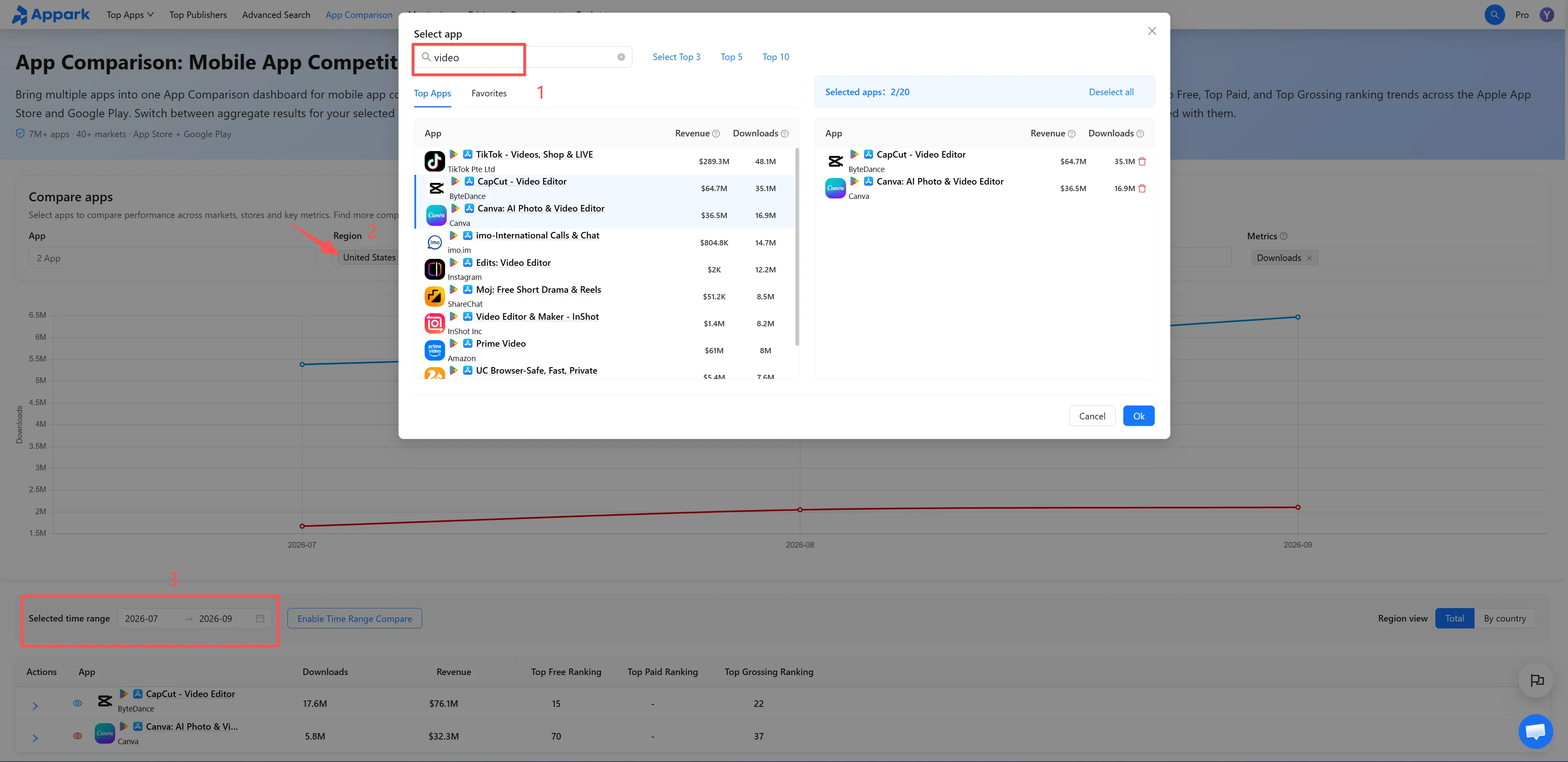
Figure 1: Add apps and align scope
2. Compare Scale and Check Whether the Gap Persists
Select Store Revenue under Metric and compare the totals in the table. Then review the chart to see whether the lead persists and when the gap begins to widen or narrow.
Keep the market, store, and date range unchanged when switching to Downloads. Check whether download scale and store revenue show a similar competitive pattern. A lead at one point does not establish performance across the entire period.
To compare store chart positions, switch to Free Chart Ranking, Paid Chart Ranking, or Grossing Chart Ranking and select the relevant category.
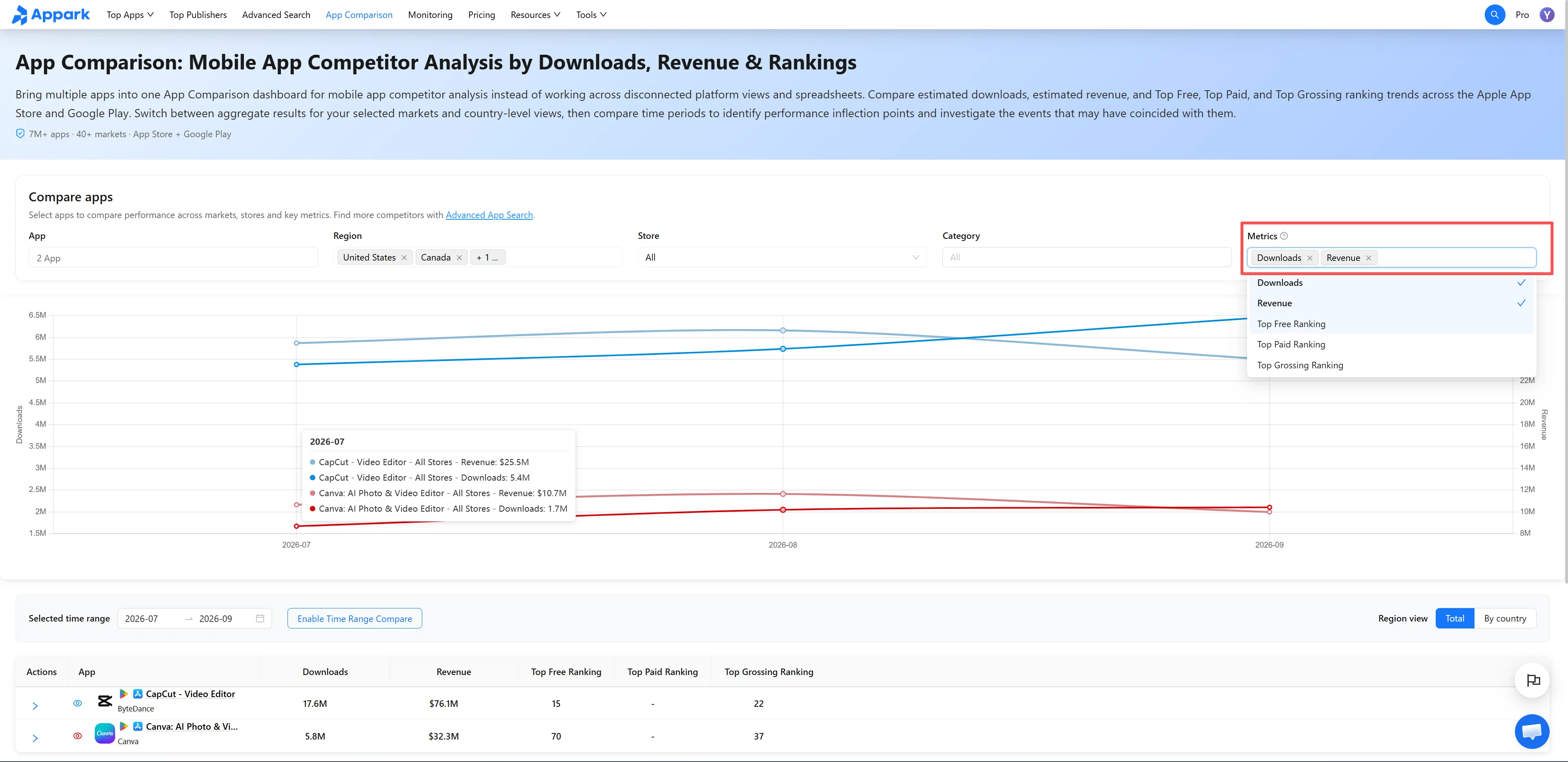
Figure 2: Compare scale and gap
3. Break Down Differences by Country and Store
Start with Summary to establish the overall gap. Then change Regional View to By Country to see whether the difference is concentrated in particular countries or appears across several markets.
Expand an app row using the arrow to its left to view App Store and Google Play data separately. To focus on one platform, select that store at the top and continue comparing.
Change one dimension at a time: review countries first, then stores. This makes it easier to identify where differences are most pronounced.
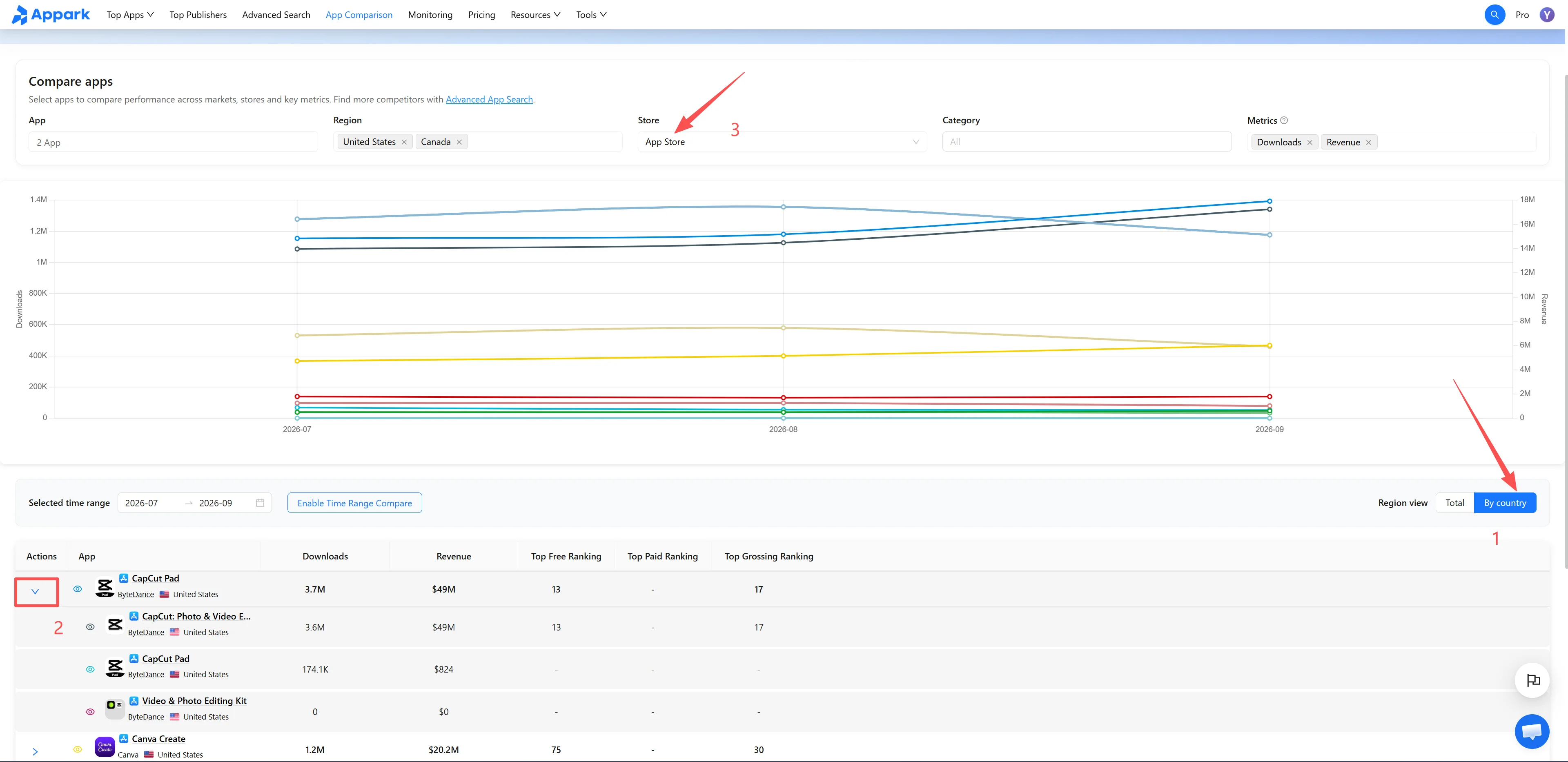
Figure 3: Break down by country and store
4. Compare Periods to Identify Changes Worth Investigating
Select Enable Period Comparison, then choose Previous Period or Custom Period. For example, compare July–September 2026 with April–June 2026. Use periods of equal length when comparing cumulative Downloads or Store Revenue.
Review one app’s trends across both periods before checking whether the gap between competitors has changed. Compare the two periods’ Downloads and Store Revenue in the table to identify apps and dates worth investigating further.
Select an app’s name in the table to open App Details and review version history and store listing changes from the same period. For ongoing tracking, add the app to your Monitoring List from App Details. Changes in performance that coincide with version updates or store listing changes provide research clues; they do not establish causation.
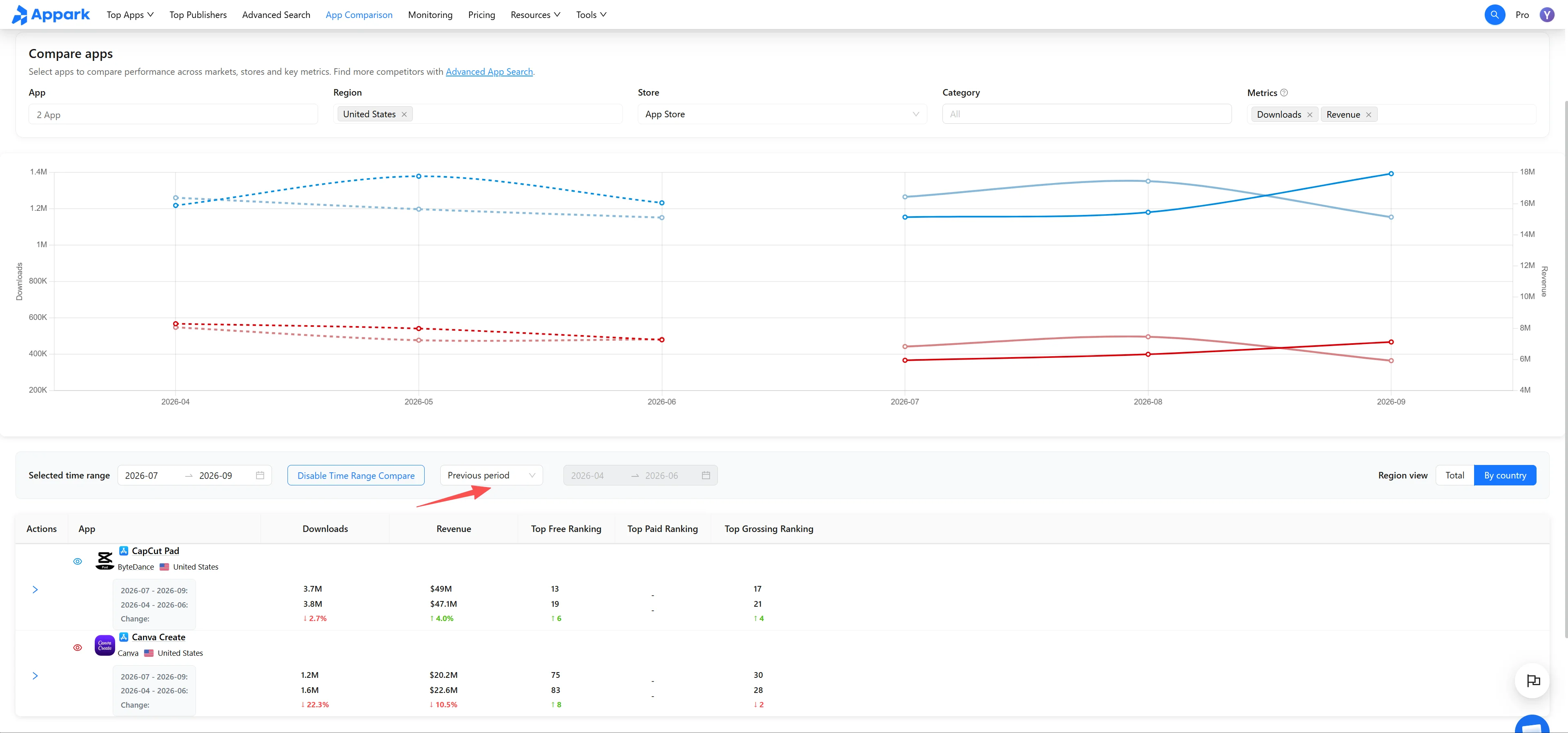
Figure 4: Period comparison
Data Metrics and Comparison Rules
What Do Downloads, Store Revenue, and Chart Rankings Measure?
| Metric | Definition |
|---|---|
| Downloads | The table shows cumulative Estimated Downloads for the selected date range, countries, and stores. |
| Store Revenue | The table shows cumulative Estimated Store Revenue for the same scope, in USD. It excludes advertising revenue, ecommerce revenue, and revenue generated outside the app stores. It does not represent developer profit. |
| Chart Ranking | Rankings come from the stores’ Free, Paid, and Grossing charts. Monthly chart points represent the app’s average ranking during that month. A lower numerical value means a higher chart position. |
Downloads and Store Revenue measure scale. Chart rankings show an app’s position on the relevant chart. A higher chart position does not mean the app leads across every metric.
How Do Store and Country Selections Affect Results?
Store. All Stores combines the same app’s Estimated Downloads and Estimated Store Revenue across the App Store and Google Play. Selecting a specific store shows only that store’s data.
Regional View. In Summary, Downloads and Store Revenue are totals for the selected countries. Selecting Global includes all markets covered by Appark. By Country shows each country’s performance separately.
Aggregated rankings. When multiple stores or countries are included, the combined ranking is an average. Rankings from different stores or countries are not added together.
Which Metrics Does Category Affect?
Category affects chart rankings only. It does not change Estimated Downloads or Estimated Store Revenue. Under All Stores, category options are grouped by App Store and Google Play. When interpreting rankings, check the selected Store, Country/Region, and Category.
How Are the Two Periods Displayed?
With Period Comparison enabled, the solid line represents the selected period and the dashed line represents the comparison period. The horizontal axis uses actual calendar dates. The table compares cumulative Downloads and Store Revenue for both periods. Differences in cumulative totals caused by unequal period lengths should not automatically be interpreted as growth.
The number of apps you can compare and the available historical data depend on your current plan. See Pricing for details.
How to Use Comparison Results for Competitor Research
Compare download scale and revenue performance. Review Downloads and Store Revenue separately to understand where a competitor leads. If two apps have similar Downloads but substantially different Store Revenue, investigate pricing and in-app purchase structures as possible explanations and sources of monetization ideas.
Prioritize markets and platforms. Break down results by country and store to identify where a competitor’s strengths are concentrated and where performance differences warrant deeper research.
Track changes in the competitive gap. Compare trends across periods to determine whether the gap is widening, narrowing, or fluctuating temporarily. Version history and store listing changes in App Details can provide context for further research.