
Use Appark’s app download and revenue growth rankings to find apps with notable growth in your target market. Sort by Absolute Growth or Growth Rate to assess the size and pace of change, then review historical trends before deciding which competitors to follow.
Open Downloads & Revenue Growth Rankings →
How to Find Growing Competitors
1. Select the Period and Target Market
In the left panel, select a Reporting Period and End Month. Choose one month for recent changes or three months for a longer comparison. Filter by Country or Region, store, and Category.
For example, select United States, App Store, and Productivity to research US iOS productivity apps. Keep the same scope when comparing candidates.
2. Shortlist Apps from the Growth Rankings
Use the Download Growth Ranking on the left to find apps with notable download growth, or the Revenue Growth Ranking on the right to investigate store-revenue growth.
Start with highly ranked apps relevant to your product. Review Absolute Growth alongside Growth Rate when building your shortlist; a large percentage increase alone does not indicate a large increase in downloads or store revenue.
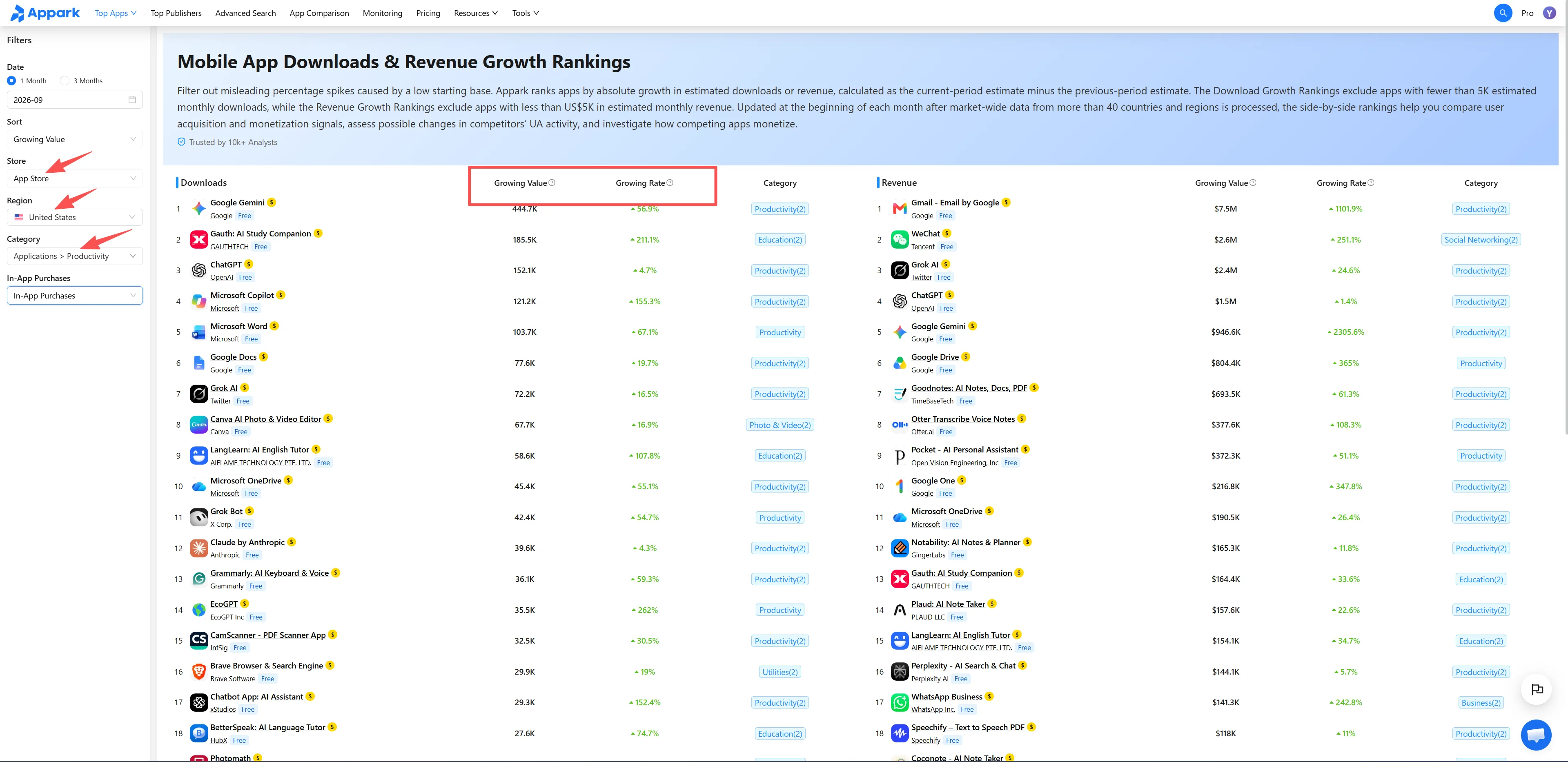
Figure 1: Shortlist from growth rankings
3. Compare Trends and Investigate Possible Signals
Select apps by clicking the blank area within their rows, then use the bottom action bar to add them to App Comparison.
Using the same market, store, and date range, review whether growth was concentrated in one month, continued afterward, or began around the same time across several apps.
Return to the rankings and investigate:
- Market distribution: Open App Details to see where downloads and store revenue are concentrated.
- Version and store listing changes: Review updates, promotional images, and copy changes near the growth period.
- Publisher portfolio: Open Publisher Details to explore the company’s other apps.
These observations provide research leads. Similar timing does not establish a shared cause; compare trends before and after an event and look for supporting evidence.
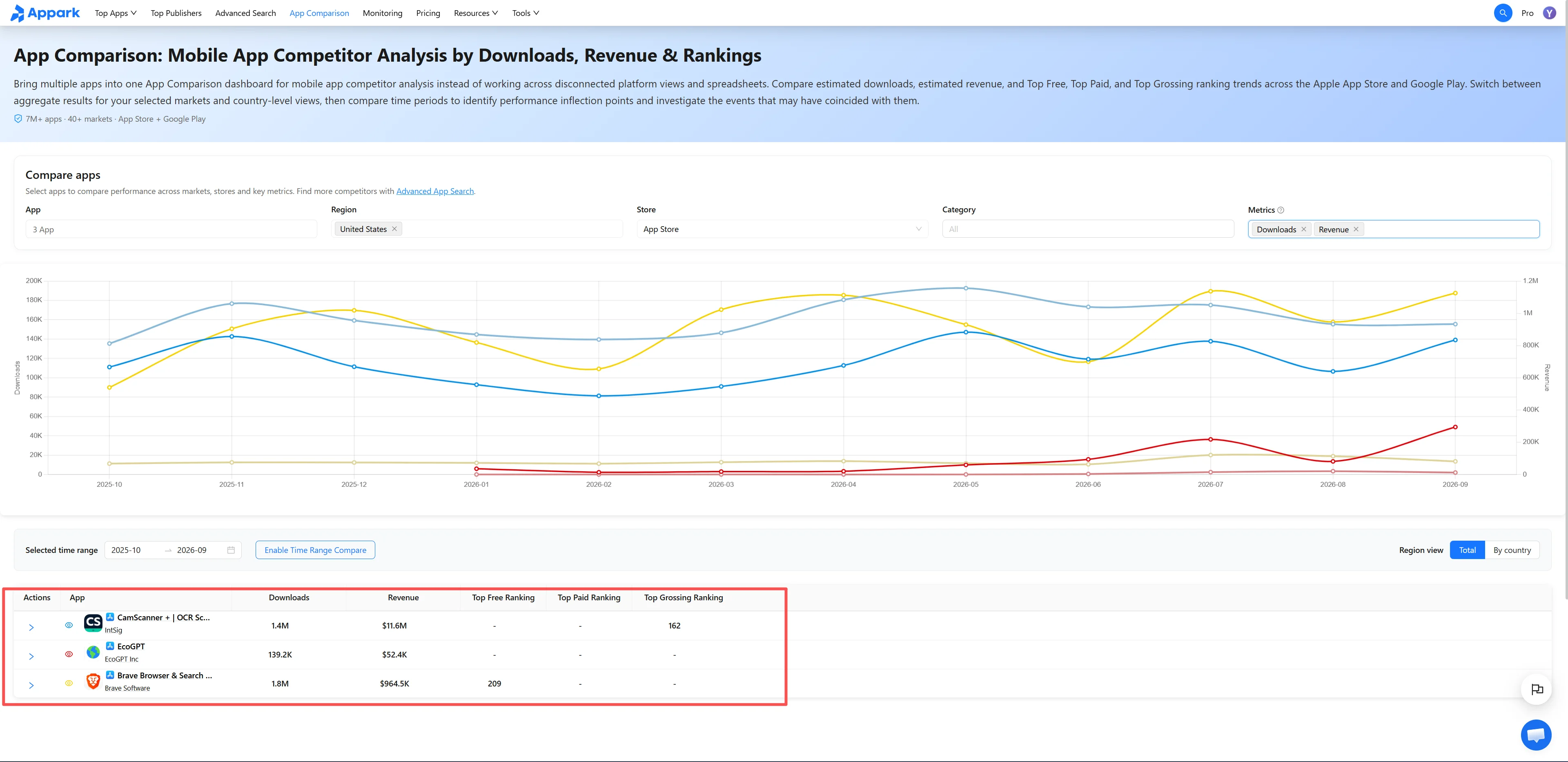
Figure 2: Compare trends
4. Add Selected Apps to Monitoring
Return to the rankings, select the apps’ rows, and use the bottom action bar to add them to your Monitoring List.
When a matching event, such as a Version Update or Ranking Change, occurs, Appark includes it in the following day’s Daily Email Digest. No empty digest is sent. Return to App Comparison to review trends around events that warrant further investigation.
Metrics and Ranking Rules
Absolute Growth and Growth Rate
Absolute Growth measures the increase between periods; Growth Rate expresses that increase relative to the Previous Period.
| Metric | Definition |
|---|---|
| Absolute Download Growth | Current Period estimated downloads − Previous Period estimated downloads |
| Absolute Revenue Growth | Current Period estimated store revenue − Previous Period estimated store revenue |
| Download Growth Rate | (Current Period estimated downloads − Previous Period estimated downloads) / Previous Period estimated downloads × 100% |
| Revenue Growth Rate | (Current Period estimated store revenue − Previous Period estimated store revenue) / Previous Period estimated store revenue × 100% |
For example, Estimated Downloads of 800,000 in August and 1,000,000 in September produce Absolute Download Growth of 200,000 and a Download Growth Rate of 25%.
Growth-rate formulas apply only when the Previous Period value is greater than zero and comparable.
Downloads and store revenue are estimates generated by Appark’s proprietary models using public app-store and market signals. They are not official developer-reported figures or audited financial results. Estimated Store Revenue includes paid downloads, in-app purchases, and store-processed subscriptions. It excludes advertising, e-commerce transactions, web payments, third-party payments, and other off-store revenue.
One-Month and Three-Month Comparisons
All reporting periods use complete calendar months. The selected End Month is the final month of the Current Period. A one-month period is compared with the immediately preceding month; a three-month period is compared with the immediately preceding three months.
| Page Selection | Current Period | Previous Period |
|---|---|---|
| 1 month, September 2026 | Sep 1–Sep 30, 2026 | Aug 1–Aug 31, 2026 |
| 3 months, ending September 2026 | Jul 1–Sep 30, 2026 | Apr 1–Jun 30, 2026 |
For three-month comparisons, Appark aggregates each period before calculating Absolute Growth and Growth Rate. The table-header “?” tooltip shows the applicable month or month range.
Sorting, Eligibility Thresholds, and Store Aggregation
Independent rankings. Selecting Absolute Growth sorts the Download Growth Ranking by Absolute Download Growth and the Revenue Growth Ranking by Absolute Revenue Growth, both in descending order. Selecting Growth Rate sorts each ranking by its corresponding rate, also in descending order. Apps on the same horizontal row may differ. Verify the app names before comparing both sides.
Separate eligibility thresholds. The Download Growth Ranking requires at least 5,000 Estimated Downloads in the Current Period. The Revenue Growth Ranking requires at least $5,000 in Estimated Store Revenue in the Current Period. Each threshold applies independently to its ranking. For three-month selections, eligibility uses the cumulative Current Period total, rather than individual months, Absolute Growth, Growth Rate, or Previous Period totals.
All Stores aggregation. Appark matches the App Store and Google Play versions of the same app and combines their downloads and store revenue separately. It then calculates growth, applies eligibility thresholds to the combined Current Period totals, and ranks the results. Selecting one store uses only that store’s data.
The rankings are updated monthly using the latest available full-month data. Available months are shown on the page.
How to Use the Data for Competitor Research
Choose a sort order that matches your question. Use Absolute Growth to find larger increases in downloads or store revenue. Use Growth Rate to find faster growth relative to the previous baseline. A small baseline can produce a high percentage with limited absolute growth, so review both metrics.
Investigate download and revenue growth separately. For apps with notable download growth, examine target markets and store positioning. For apps with notable store-revenue growth, review payment models and version changes. An app’s position in one ranking does not establish growth in the other metric.
Review persistence before drawing conclusions. Large Absolute Growth does not automatically indicate strong long-term performance. Examine monthly trends within three-month totals, check whether growth continued afterward, and monitor subsequent events. A store listing or version change may coincide with growth, but further evidence is needed to identify its cause.
Use Downloads & Revenue Rankings to assess estimated download and store-revenue scale. Use Advanced Search to filter apps by specific download or revenue ranges.