
Free Google Play ASO Tools: App Keyword Ranking, App Reviews Download & App Core Data
Install Free & Start Now
Google Play ASO Tools: Keyword Ranking, Reviews Download & Core Data
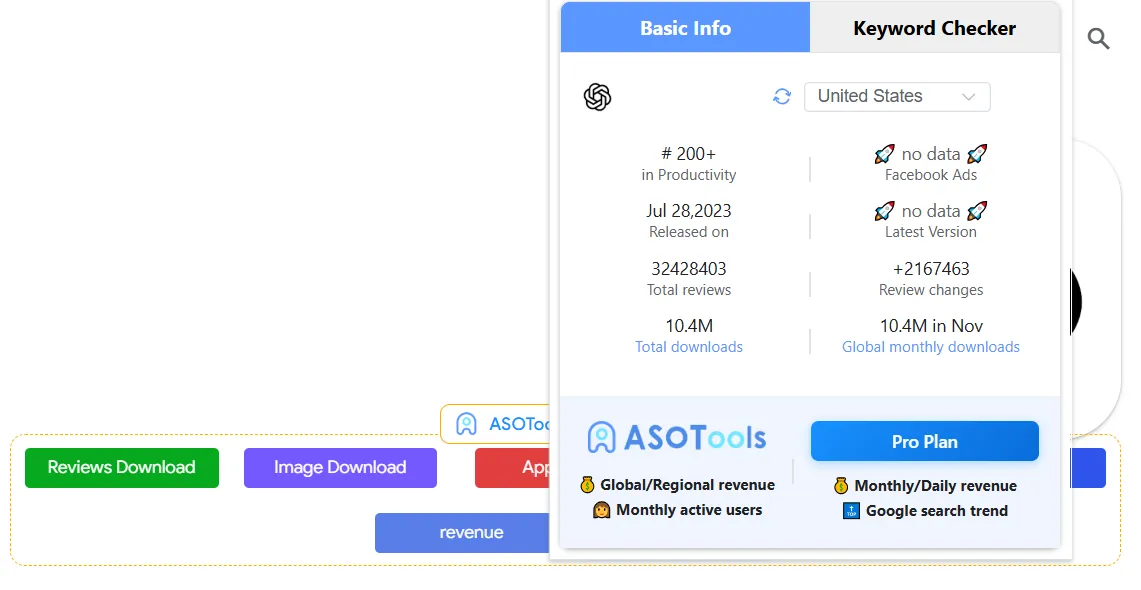
Core Data Panel: Downloads, Review Trends, Category Rank & Version History
The core data panel is your on-page Google Play ASO overview: downloads, review trends, category rank, and version history in one place—see essentials without leaving the listing and diagnose performance quickly.

App Keyword Ranking Tool for Google Play: Rank, Volume & KD
The Keyword Checker panel is your app keyword ranking tool on Google Play: real-time keyword relevance, popularity, search volume, difficulty (KD), and rank—so you can steer ASO with data.
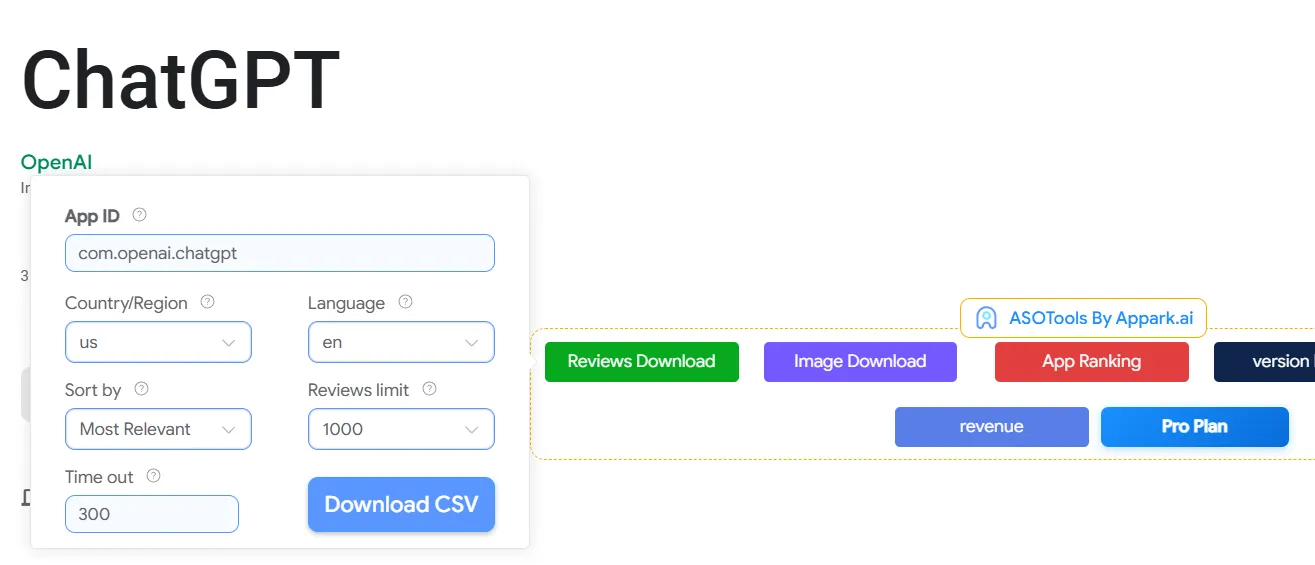
App Reviews Download Tool: Export Google Play Reviews to CSV
A dedicated app reviews download tool: batch-export Google Play user reviews to CSV, with filters for country and language—ideal for feedback analysis and competitor sentiment tracking.

One-Click App Assets Download for Competitor Creative Research
Download icons, preview screenshots, and feature graphics in one click—gather competitor creatives for design inspiration and ASO reference, alongside your keyword ranking and reviews download workflows.
Three Steps to Use These Google Play ASO Tools
Free, simple, and efficient—start with core data on the listing, then keyword ranking and reviews download on the same page.
Install the Free Chrome Extension
Open a Google Play App or Chart Page
Use Core Data, Keyword Ranking & Reviews Download
Who Needs These Free Google Play ASO Tools?
From product iteration to market promotion—Appark’s Google Play ASO tools combine core data, keyword ranking, and reviews download on the store page.
ASO/Marketing Specialists
App Developers / Product Managers
Growth Hackers / Data Analysts
Why Choose Appark Free Google Play ASO Tools?
Free, powerful, and convenient—keyword ranking, reviews download, and core data in one Chrome extension on Google Play.
Completely Free Core Features
Seamless In-Browser Experience
Accurate & Real-Time Data
All-in-One Data Support
What Our Users Say: Real Feedback
How Appark’s Google Play ASO tools—including core data, keyword ranking, and reviews download—are changing day-to-day workflows.

Jessica Wilson
ASO Consultant
The bulk reviews download feature is a lifesaver! It used to take me half a day, now it's done in seconds, allowing me more time for deep analysis.

Anna Smith
Independent Developer
I love the App Keyword Ranking tool and the data overview. It helps a novice like me quickly gauge app performance, and the fact that it's completely free is amazing.

Michael Johnson
Product Manager
The version history and core data panel allow me to track competitor movements quickly, streamlining my research process significantly.

Sarah Chen
Marketing Specialist
The one-click asset download feature is a huge help. It makes collecting competitor creative material easy and is essential for competitive analysis.

Leo Wen
Competitor Analyst
This extension is crucial for market assessment. Being able to see estimated data and competitor details right on the Google Play page is indispensable.

David King
Small Studio Lead
For small teams with limited resources, the powerful, free data provided by Appark is a massive advantage. It drastically lowers our ASO costs.

Wang Lei
Data Analyst
Appark's real-time data and competitor metrics are crucial for A/B testing and validation. It lets me quickly cross-reference external reports, ensuring my decisions are purely data-driven.

Lin Yue
Content Creator
As a content creator, I constantly need app assets for review videos. The one-click download feature eliminates tedious screenshotting and editing, drastically speeding up my content creation workflow.
Frequently Asked Questions (FAQ)
Common questions about Appark’s Google Play ASO tools and Chrome extension.
Ready to Boost Your App's Growth?
Install Appark’s free Google Play ASO tools—core data, keyword ranking, and reviews download—on the store page today.
Free Install & Get Started