

Bulk Upload Your App Icons
Drag & drop 512×512 square app icons. Supports PNG / JPG / JPEG, up to 100 images.
Uploaded: 0 / 100
Visualize the 'Cut Zone'
Don't let the 10% increase ruin your icon's aesthetics. Our tool highlights exactly what gets cropped.
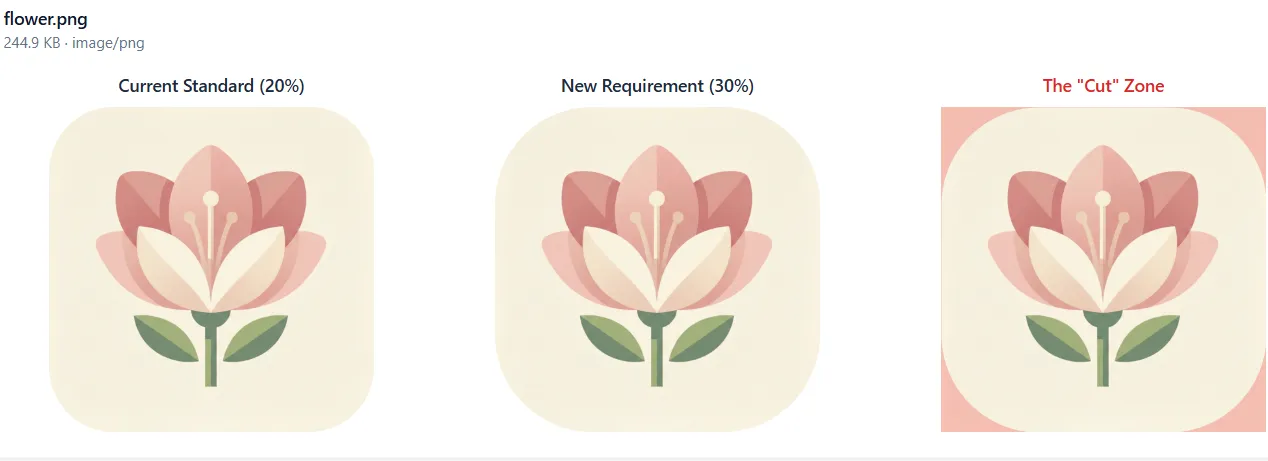
Instant 30% Radius Simulation
Upload your 512x512px PNG and instantly see the 30% (154px) mask. The red highlight shows the 'Cut Zone' under the new Material 3 Expressive standards.
Need a custom corner radius? Try our universal Image Corner Rounder.
Why You Must Validate Your App Icon
2026 Compliance Ready
Align with the 154px (30%) rendering standard before the March 31, 2026 deadline to ensure zero visual errors.
Avoid Console Rejections
Many apps are rejected for 'distorted icons' after the auto-masking. Validate your Safe Zone to pass the review on the first attempt.
Boost Store CTR
A professionally centered icon without clipped edges leads to higher click-through rates and better brand perception.
3 Simple Steps to Compliance
Validate your assets locally in seconds
Upload 512px Original
Verify 384px Safe Zone
Audit the Corners
Professional Standards by Appark
High-precision tools for global Android developers.
Pixel-Perfect Accuracy
Our algorithm strictly follows the official 154px (30%) radius specs for 2026.
Bulk Icon Preview Support
Upload and preview up to 10 icons simultaneously to save time, ideal for developers managing multiple apps.
100% Local & Private
Your assets never leave your browser. We value your intellectual property—no uploads, no data storage.
Google Play Icon Specs & FAQ
Everything you need to know about the 2026 Service Update.
Is Your Icon Ready for Material 3 Expressive?
Validate your app icon for free with Appark. Ensure a perfect display in the 2026 Google Play Store.