


10 Mobile App Development Tips for Indie Developers (2026)
Building a mobile app is easier than ever in 2026. AI coding tools, cross-platform frameworks, and low-cost infrastructure have lowered the technical barrier, but they have not removed the biggest risk: spending weeks building something that nobody wants.
For indie developers, the challenge is often less about writing code and more about making better decisions before and after launch. Market research, competitor analysis, product scope, and performance data can all help reduce unnecessary development work.
This guide covers 10 practical mobile app development tips for indie developers, from validating an idea and choosing a niche to analyzing competitors and using market data after launch.
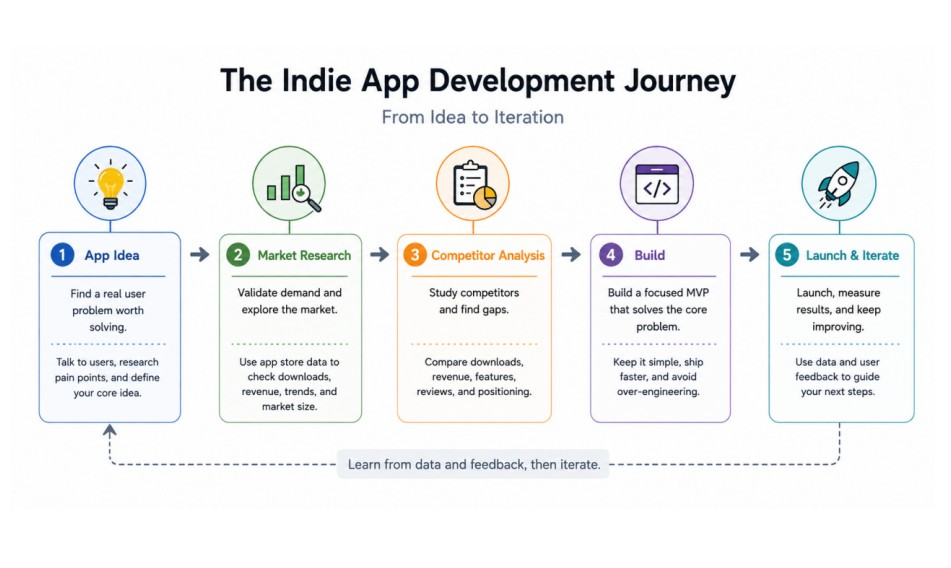
1. Validate Your App Idea Before Building
Tip 1: Start With a Real User Problem
You may already have a long list of app ideas in your notes. The problem is that an interesting idea is not necessarily a useful product.
Start with a specific problem that a defined group of users already has. Look at discussions on Reddit, X, community forums, and app reviews to understand what people struggle with repeatedly.
The goal is not to find an idea that sounds impressive. It is to find a problem that users already spend time, money, or effort trying to solve.
Tip 2: Validate a Mobile App Idea With Market Data
User feedback is useful, but it should not be your only source of validation.
Look at existing apps in the same category on the App Store and Google Play. Strong download performance can indicate user demand, while consistent revenue performance can provide evidence that people are willing to pay for solutions in that market.
You can also use app rankings to see which products are gaining or losing momentum rather than relying on a single snapshot.
Tip 3: Check Demand Before Investing Your Time
An MVP can still take weeks or months to build. Before committing to development, answer a few basic questions:
- Are people already downloading apps that solve a similar problem?
- Do some of those apps generate meaningful revenue?
- Is there room for another product in the category?
- Can you serve a specific user group better than existing options?
This early research does not guarantee success, but it can help you eliminate weak ideas before they consume your development time.
2. Research the Market and Find Your Niche
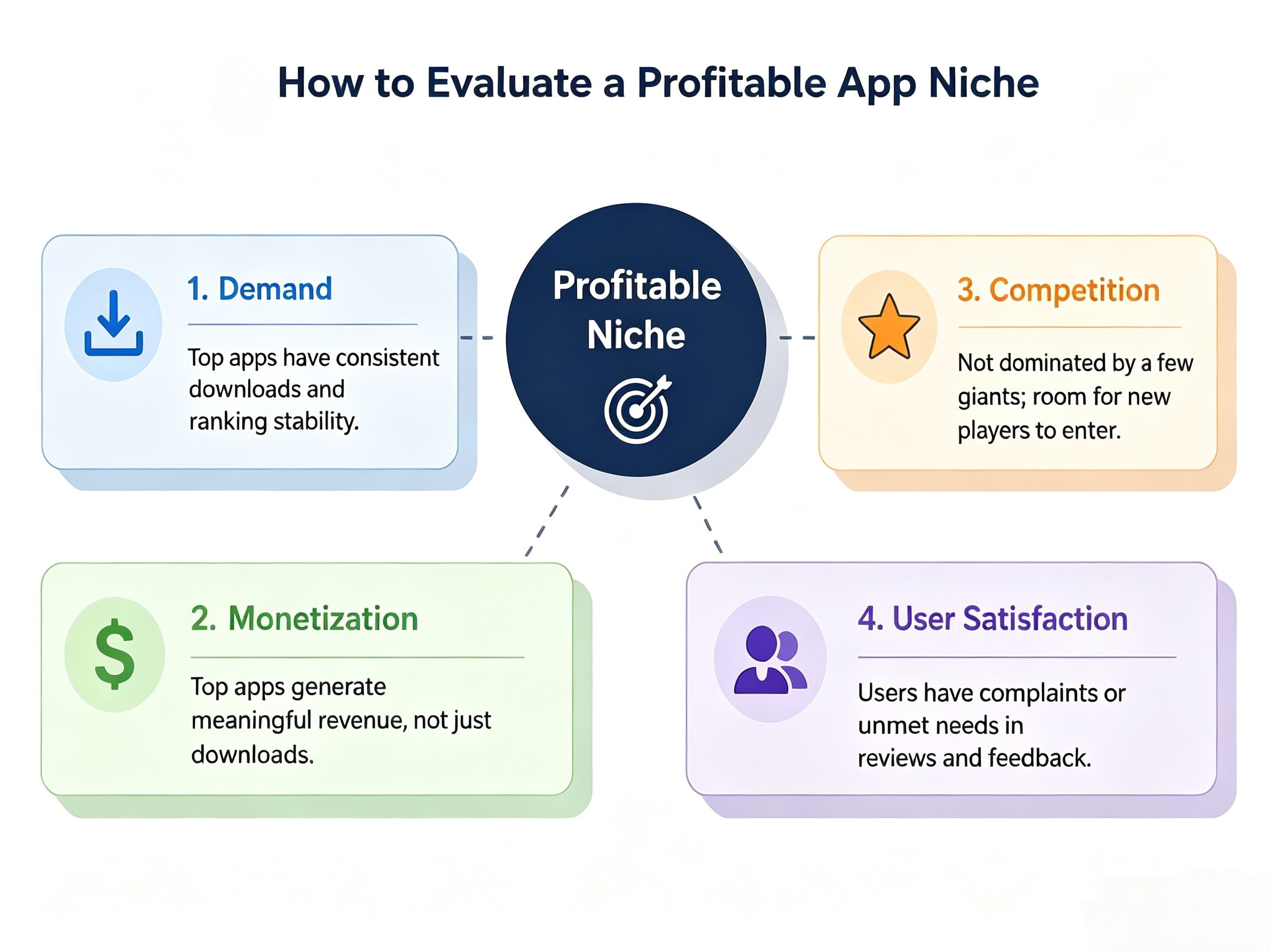
Tip 4: Find a Profitable App Niche
Competing directly with established apps is rarely the easiest path for an indie developer.
Instead of building another generic task manager or habit tracker, look for a narrower audience with a specific need. A habit tracker for night-shift workers, for example, has a clearer target audience than a general habit-tracking app.
When evaluating a profitable app niche, look for a combination of demand, monetization potential, and a competitive environment that you can realistically enter.
Tip 5: Use App Store Research to Spot Opportunities
App Store and Google Play rankings can reveal more than which apps are currently popular.
Look for categories with:
- Several apps showing steady download growth
- Revenue among multiple competitors rather than a single dominant product
- Newer apps entering the rankings
- Smaller apps gaining traction
- User complaints that appear repeatedly in reviews
These signals can help you identify markets where demand exists but the product experience may still have room for improvement.
For broader app store research, comparing download trends with app revenue rankings can help you identify markets with strong demand and monetization potential.
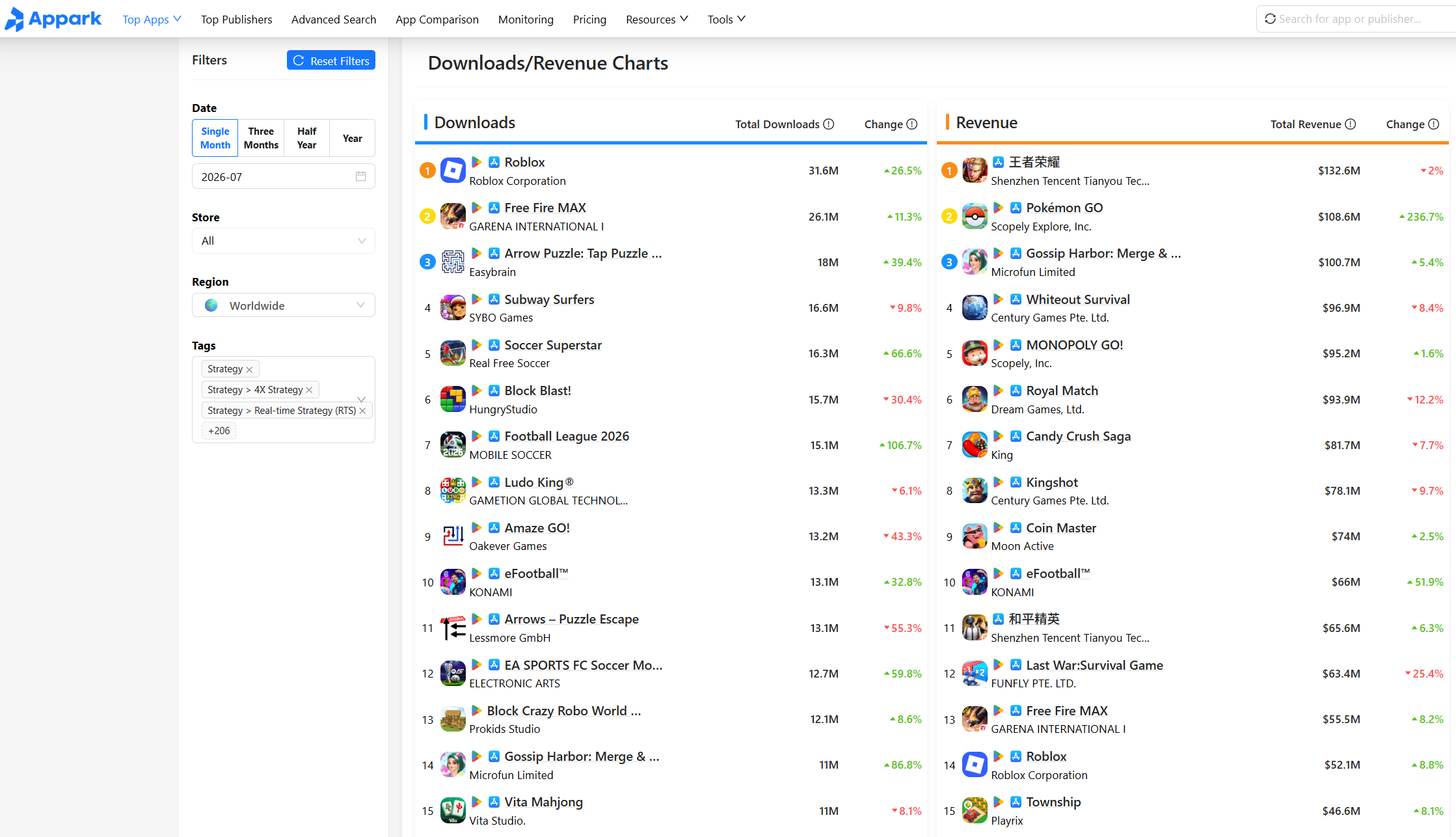
Tip 6: Avoid Entering an Overcrowded Market
A large market is not automatically a good market for an indie developer.
If a category is dominated by a few highly established apps with enormous download volumes and strong brand recognition, competing on the same terms may require resources you do not have.
Look for smaller opportunities where demand is visible but competition is more manageable. A niche with fewer users can still be attractive if those users have a clear problem and a willingness to pay.
3. Analyze Competitors Before Writing Too Much Code
Tip 7: Conduct a Simple App Competitor Analysis
Once you have identified your main competitors, the next step is to compare them using consistent market signals.
Instead of looking only at app features or screenshots, pay attention to downloads, revenue, rankings, publisher performance, and changes over time.
For indie developers, checking all of this data manually can be time-consuming. Tools like Appark can bring these signals together in one place, making it easier to compare competitors and spot potential opportunities.
Here are some of the key data points you can use for a simple competitor analysis:
| Data Point | Appark Capability | What to Compare | Why It Matters |
|---|---|---|---|
| Download Rankings | App download rankings and historical ranking data | Download levels and ranking movement | Helps estimate demand and identify growing apps |
| Revenue Rankings | App revenue rankings and revenue trends | Revenue performance across competitors | Shows whether users are willing to pay |
| Publisher Rankings | Publisher rankings and publisher performance | Competitor publisher strength and portfolio | Helps distinguish independent players from larger publishers |
| Competitor Comparison | Compare apps across downloads, revenue, and rankings | Performance differences between selected apps | Makes market positioning easier to understand |
| Competitor Monitoring | Monitor selected apps and ranking changes | Updates, ranking movements, ratings, and other changes | Helps track competitors over time |
| Market Search | Search and filter apps by category, region, downloads, revenue, and other criteria | Emerging or less obvious competitors | Helps uncover smaller players beyond the top charts |
The important point is to use these numbers as signals rather than treating any single metric as proof of success. App market data is generally estimated, so trends and relative performance are often more useful than individual figures.
Look for Gaps Instead of Copying Features
Competitor research should not become a feature-copying exercise.
Read two-star and three-star reviews, look for repeated complaints, and identify user groups that existing products may not serve well.
The strongest opportunity is often not a completely new feature. It may be a simpler workflow, a better experience for a specific audience, or a solution to a problem that larger competitors have overlooked.
4. Build a Small Product and Avoid Common Mistakes
Tip 8: Keep Your MVP Focused
Your Minimum Viable Product should solve one clearly defined problem well.
Remove secondary features, complicated settings, and unnecessary customization from the first version. The purpose of an MVP is to test whether the core product provides enough value for people to use it.
A smaller first release also gives you more time to learn from real users instead of spending months polishing features that have not been validated.
Avoid Overengineering Your First Version
Do not build a complex technical architecture simply because you can.
For an unproven product, simple and reliable technologies are often enough to get the first version into users' hands. Frameworks such as Flutter, React Native, Swift, or Kotlin can all be appropriate depending on the product and your existing skills.
The right technology is usually the one that helps you test the product quickly without creating unnecessary maintenance work.
Common App Development Mistakes Indie Developers Should Avoid
Some of the most common app development mistakes are not technical:
- Spending months building features nobody asked for
- Choosing a market without checking existing demand
- Copying competitors without understanding their users
- Focusing only on downloads and ignoring revenue signals
- Launching without a way to measure performance
- Treating one successful or unsuccessful week as a long-term trend
The earlier you identify these mistakes, the less expensive they are to fix.
5. Use Market Data to Measure Your App After Launch
Tip 9: Track Downloads, Revenue, and Rankings
Launching your app does not end the research process.
After launch, monitor how your app performs relative to the market. Changes in downloads, revenue, and rankings can help you understand whether your product is gaining traction and how competitors are moving at the same time.
Internal product analytics are important for understanding user behavior inside your app. Market-level data provides a different perspective: how your product is performing compared with the broader market.
Use App Analytics for Indie Developers
Indie developers do not necessarily need a large analytics stack from day one.
Start with a small set of metrics that can support actual decisions. Depending on your product, these might include downloads, revenue, rankings, retention, and user feedback.
For app analytics for indie developers, it is useful to separate two types of data:
- Product analytics: what users do inside your app
- Market analytics: how your app and competitors perform in the wider market
Both can be useful, but they answer different questions.
Use Appark to Monitor App Market Performance
For market-level analysis, Appark provides a free way to explore app performance across the App Store and Google Play.
Its main features include download rankings, revenue rankings, publisher rankings, competitor analysis, and app monitoring. This makes it useful when you want to compare competitors, research a category, or keep track of changes after launch.
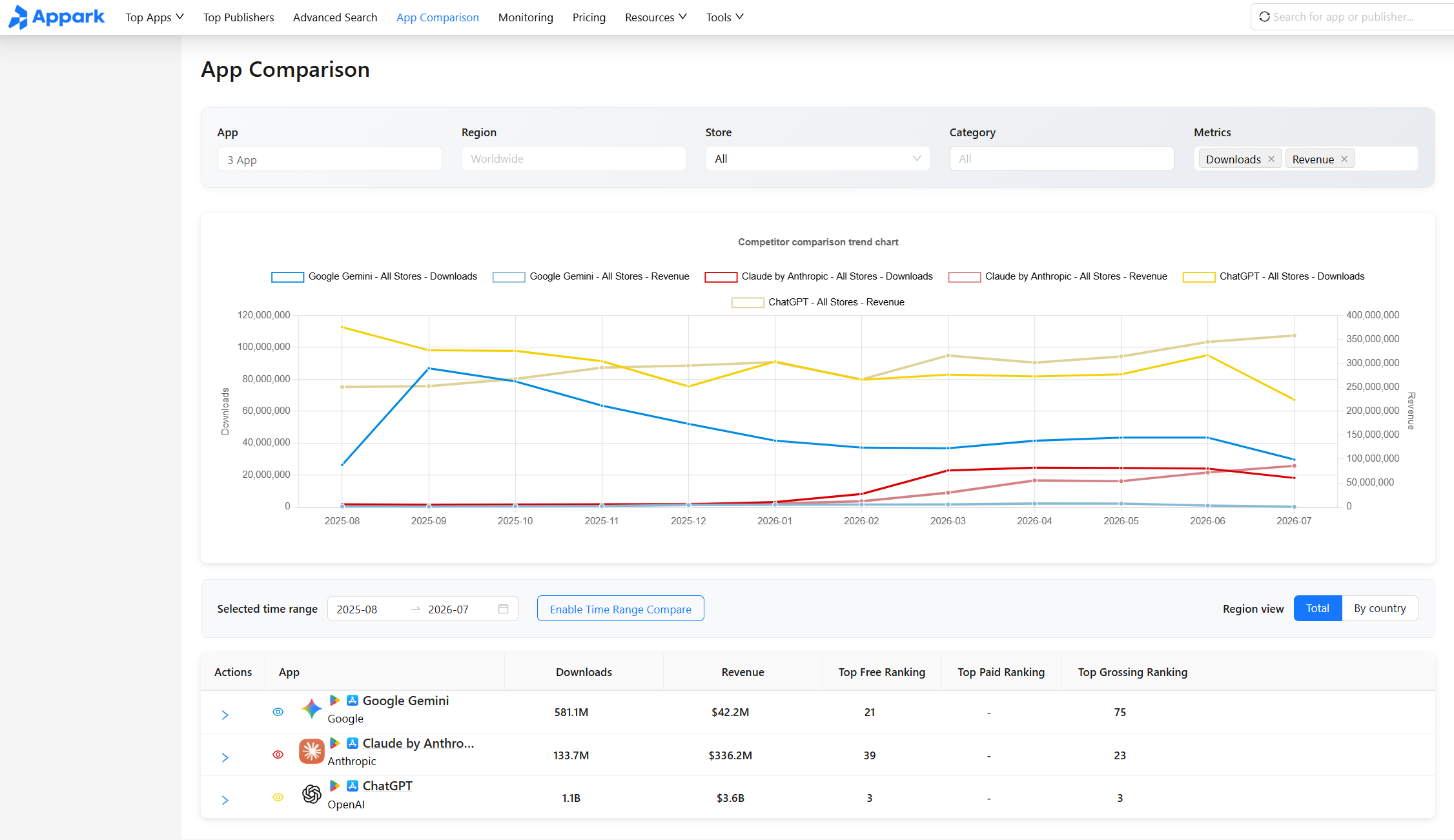
Rather than checking competitors manually every week, you can use ranking and monitoring data to identify meaningful changes and decide which ones are worth investigating further.
6. Iterate Based on What the Market Tells You
Monitor Competitor Changes Over Time
A competitor analysis is most useful when you treat it as an ongoing process rather than a one-time research task.
A single snapshot only tells you where an app stands today. It does not tell you whether the product is growing, losing momentum, or changing its market position.
Track your most relevant competitors over several weeks or months and pay attention to:
- Download rankings and estimated download trends
- Revenue rankings and estimated revenue trends
- Publisher performance
- App ratings and review activity
- Major product updates
- Changes in market positioning
You do not need to monitor every competitor in your category. Start with a small group of direct competitors that target the same users or solve a similar problem.
For example, suppose a competing app suddenly moves up in the rankings after releasing a major update. That does not necessarily mean the new feature caused the growth. Other factors, such as seasonality, marketing activity, or changes in user demand, could also be responsible.
However, the change gives you something worth investigating:
- What changed in the product?
- When did the ranking movement begin?
- Did downloads or revenue change at the same time?
- Did other competitors experience similar changes?
The same principle applies when a competitor starts losing momentum. A sustained decline may indicate changing user preferences, stronger competition, product issues, or a temporary market fluctuation.
The important thing is to look for patterns over time rather than reacting to individual changes.
Turn Market Insights Into Your Next Product Decision
Good indie app developer tips are ultimately about reducing wasted effort.
Market data should not replace product judgment. Instead, it gives you another source of evidence when deciding what deserves your limited development time.
A useful decision process is to combine three types of information:
- Market data: What is happening in the broader category?
- User feedback: What do users like or dislike about existing products?
- Product analytics: How are users behaving inside your own app?
For example, market data may show that a competitor is gaining downloads quickly. User reviews might reveal that people particularly like one of its features.
Your own product analytics may then show that users are already engaging with a similar workflow in your app.
Together, these signals could suggest that improving that workflow is more valuable than adding an unrelated feature.
The opposite can also happen. A feature may appear popular among competitors, but if your own users rarely use the equivalent feature, blindly copying it may not be the best decision.
This creates a practical development cycle:
Research → Build → Launch → Measure → Learn → Iterate
The purpose is not to make every decision based on data. It is to make important decisions with more context and fewer assumptions.
For an indie developer, that can mean spending less time building features that have little impact and more time improving things users actually need.
FAQ
How can indie developers validate a mobile app idea?
Indie developers can validate an idea by researching existing apps, download trends, revenue performance, competitors, and user feedback on the App Store and Google Play before starting development.
Start by finding several apps that solve a similar problem and check whether they attract meaningful demand. Look at:
- Download performance
- App rankings
- Estimated revenue
- Changes in performance over time
- User reviews and ratings
If multiple apps in the same category consistently attract users and generate revenue, that is a stronger signal than seeing one successful app.
You should also examine user reviews and online discussions to understand what existing products do well and where users remain frustrated.
The combination of market data and user feedback can help you determine whether there is a real opportunity and what kind of product could address it.
No validation method can guarantee success. The goal is to reduce uncertainty before investing significant development time.
How do I find a profitable app niche?
Look for categories with clear user demand, multiple apps generating revenue, and opportunities to serve a specific audience.
A smaller niche can be more realistic for an indie developer than competing directly with the largest apps in a broad category.
When researching a niche, compare four areas:
- Demand: Are people actively downloading similar apps?
- Monetization: Are multiple apps generating revenue?
- Competition: Is the market dominated by a few major players?
- User satisfaction: Are there recurring complaints or unmet needs?
Download trends can help indicate demand, while revenue performance provides clues about whether users are willing to pay.
You should also check how concentrated the market is. If a few large publishers dominate the entire category, entering with limited resources may be difficult.
User reviews can reveal another important opportunity. If several competing apps have recurring complaints or fail to serve a particular group of users well, there may be room for a more focused product.
The goal is not to find a niche with zero competition. A completely empty market may have little demand.
Instead, look for a market where demand is already visible but there is still a realistic way for an indie developer to differentiate.
What should I include in an app competitor analysis?
Start with downloads, revenue, rankings, publisher performance, product positioning, user reviews, and release activity.
Comparing several competitors over time is generally more useful than looking at a single metric.
First, identify five to ten relevant competitors. They do not have to be the biggest apps in the entire category. Prioritize products that:
- Target the same audience
- Solve a similar problem
- Compete for the same use case
- Operate in the same market
Then compare their market performance.
Download rankings can help you understand demand and relative popularity, while revenue rankings provide additional information about monetization. Publisher rankings can also show whether a competitor is part of a larger app portfolio.
Finally, combine the numbers with qualitative research:
- Read recent user reviews
- Check major product updates
- Look for repeated complaints
- Identify frequently requested features
- Compare how competitors position their products
This helps you move beyond “What are competitors doing?” to the more useful question: “Where is there still room to build something better?”
What app analytics should indie developers track?
For product analytics, focus on metrics such as retention, engagement, conversion, and revenue that relate to your business model.
These metrics help you understand what users do inside your app and whether they continue to get value from it.
For market analysis, downloads, revenue estimates, rankings, publisher performance, and competitor movements can provide additional context.
It is useful to think of these as two separate layers:
- Product analytics: What are users doing inside my app?
- Market analytics: How is my app positioned within the wider market?
Product analytics can help you identify problems with the user experience, while market analytics can help you understand demand, competitors, and changes in the category.
You do not need to track every possible metric. Start with the data that can actually influence a product decision.
If a metric does not help you decide what to build, improve, or investigate next, it may not deserve much attention.
How often should indie developers analyze competitors?
There is no single schedule that works for every app.
For a new product or a rapidly changing category, checking important competitors weekly can help you spot meaningful changes early. For more stable markets, reviewing competitors every few weeks or once a month may be enough.
The key is consistency. Regular observations make it easier to distinguish temporary fluctuations from sustained trends.
You should also conduct a deeper review when a major competitor:
- Launches an important update
- Changes its product positioning
- Enters a new market
- Shows a significant change in downloads
- Experiences a noticeable revenue or ranking movement
These events can provide useful clues about where the market may be heading.
Build With Data, Not Just Code
For indie developers, the biggest challenge is often not building an app, but deciding what to build and what to improve next.
Validate your idea, study the market, analyze competitors, then use what you learn after launch to guide the next iteration.
You do not need to predict the perfect product from day one. You just need to make each decision with better information than the last.
If you are researching an app idea or comparing competitors, Appark can help you explore download rankings, revenue rankings, publisher performance, and competitor data across the App Store and Google Play.
Explore the market first, then build with more confidence.