


How to Monitor App Store Rankings: The Automated Workflow & Tool Guide (2025)
You wake up, check the App Store, and realize your biggest competitor has suddenly jumped 20 spots in the rankings. Why? Did they drop their price? Did they release a killer new feature? Or did they just run a huge ad campaign? Trying to figure this out manually is impossible. You cannot refresh 50 different app pages every day waiting for a change. You need an automated intelligence system. This guide will show you how to set up a "Monitor-Alert-Analyze" workflow to track app store rankings and competitor updates automatically.
Why Ranking is Only Half the Story
Many developers make the mistake of only looking at the charts. (We explained why this is insufficient in our previous article on Why Mobile App Competitor Analysis Matters).
App Store Rankings are a "Lagging Indicator"—they are the result, not the cause. To truly understand the market, you need to monitor the "Leading Indicators"—the actions that cause the rankings to change:
- Version Updates: Did they change their keywords or add a new feature?
- Price Changes: Did they lower the price to boost downloads?
- Metadata Changes: Did they update their screenshots to improve conversion rates?
By connecting these dots, you move from data to decision. Here is how to build this automated workflow in 3 steps.
Step 1: Build a "Smart" Competitor Watchlist
The first step in app competitor monitoring is selecting the right targets. Don't just fill your list with the Top 3 giants (like TikTok or Instagram). Their budget is too different from yours. You need to find "Niche Competitors"—apps that are similar to your size but growing fast.
How to execute with Appark:
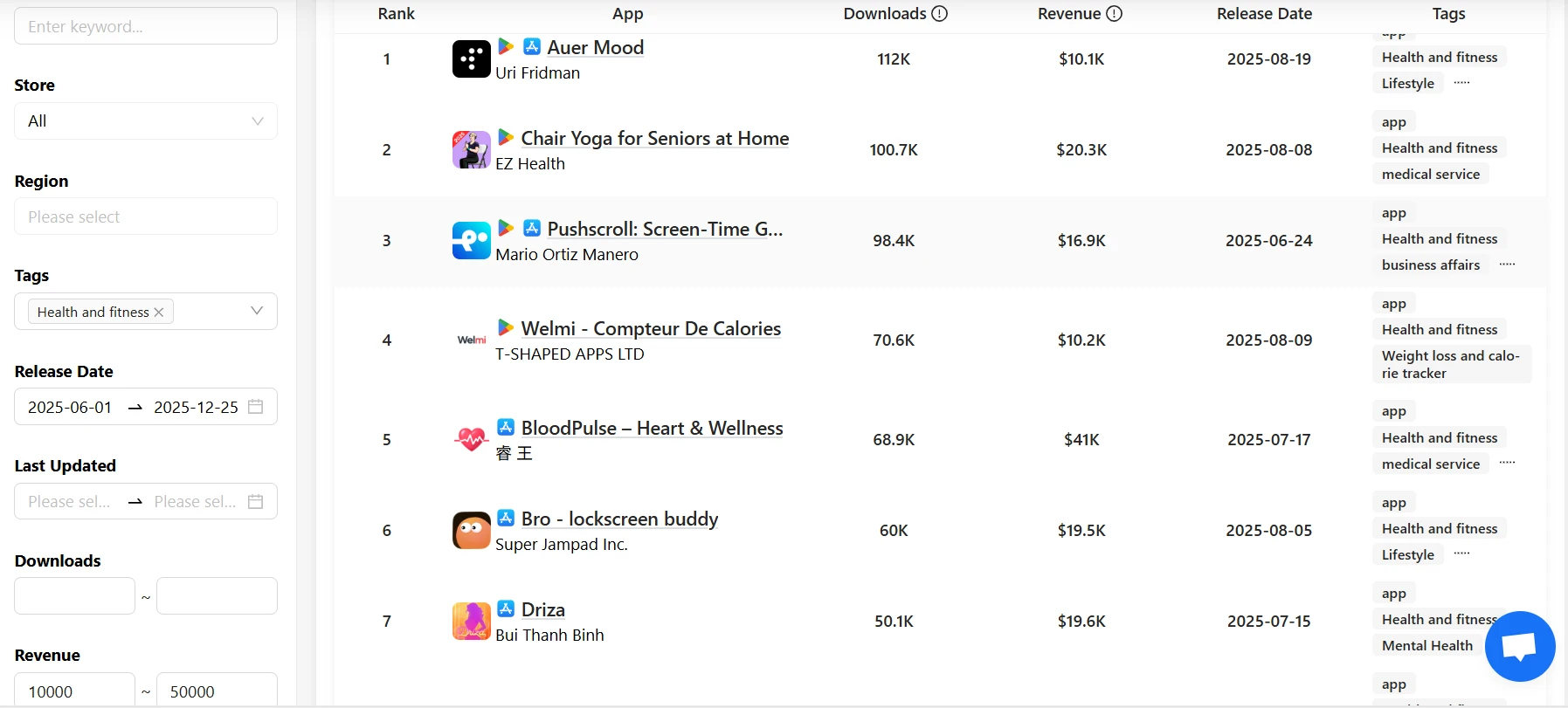
- Go to Advanced Search.
- Don't just search by category. Set specific filters for Revenue or Downloads.
- Example: Filter for apps in the "Health & Fitness" category that generate $10k - $50k monthly revenue.
- Filter by Release Date to find recently launched apps that are gaining traction.
(Note: For a deep dive on how to analyze these competitors once you find them, read our guide: How to Do Mobile App Competitor Analysis).
These "mid-tier" apps are your true rivals. Their strategies are often reproducible and worth studying.
Step 2: Automate the Tracking Process
Once you have identified your key competitors, you need to stop checking them manually. You need a system that pushes information to you.
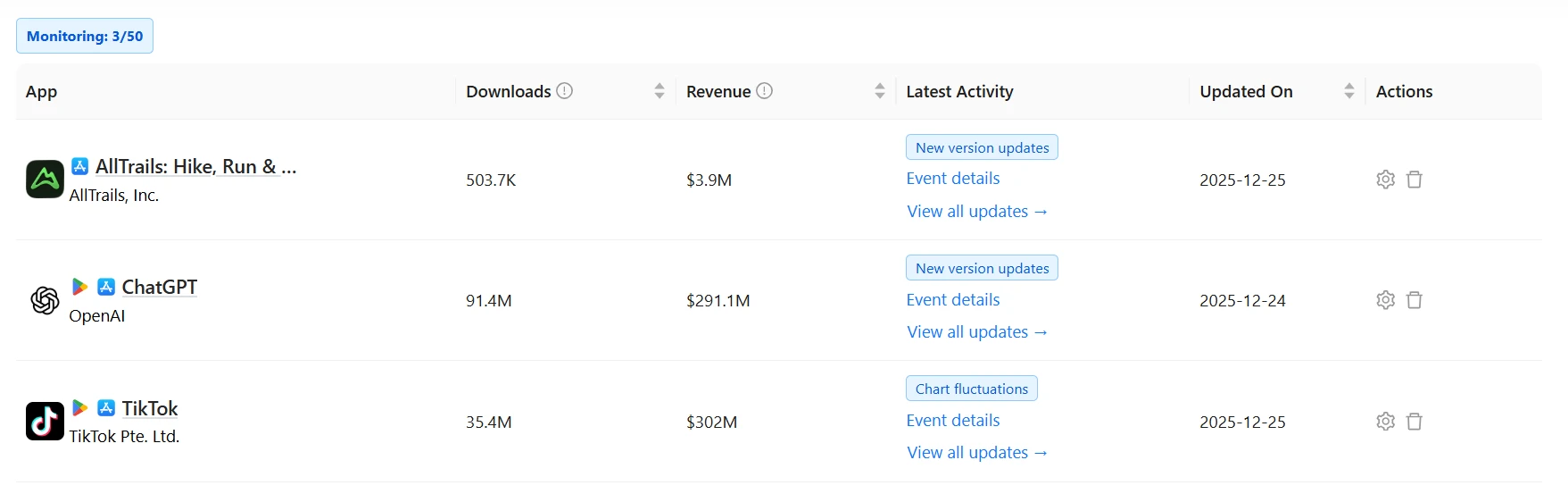
The "Set and Forget" Workflow: In Appark, add these apps to your Monitoring List. The system supports tracking up to 50 apps per account. Once added, the system acts as a 24/7 radar for three critical triggers:
- Rank Changes: Get notified if an app enters or drops out of the Top Charts.
- Version Updates: Know the exact moment a competitor releases a new version.
- Commercial Changes: Detect if an app changes its price or is removed from the store (Availability).
The Benefit: Instead of spending hours digging for data, you can check your dashboard to see only the apps that moved. This allows you to focus on strategy, not data entry.
Step 3: Analyze the "Why" (Connecting the Dots)
This is the most critical step. When you receive an alert that a competitor's ranking has spiked, you need to find out why.
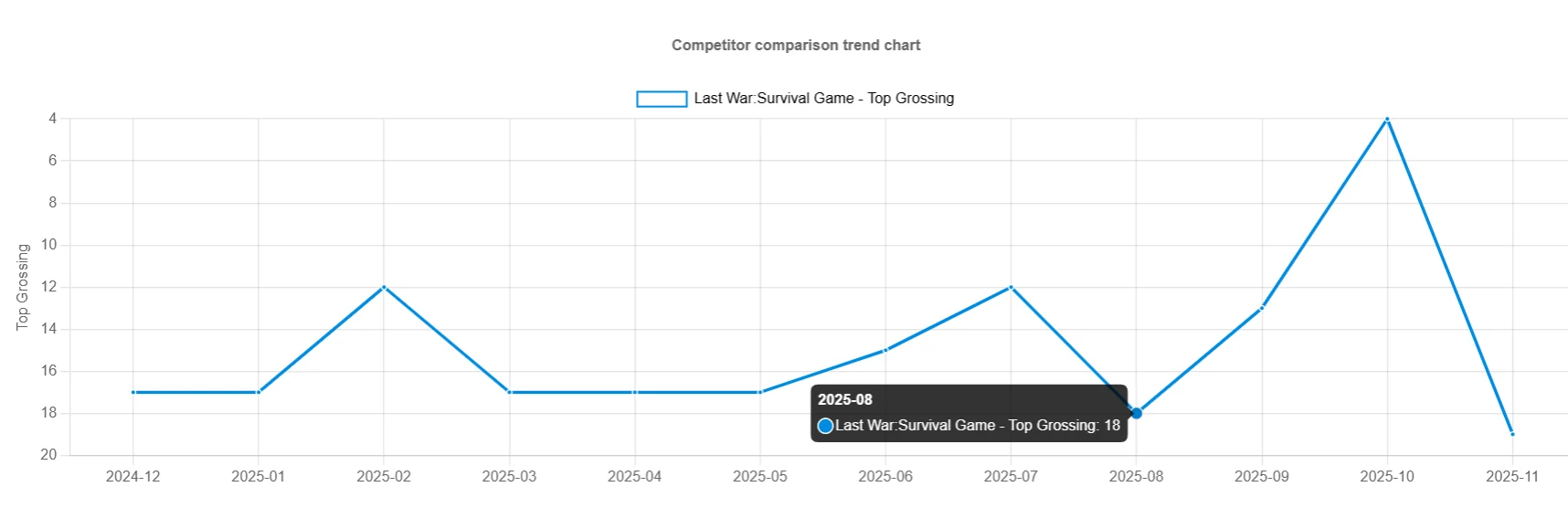
The Analysis Logic: Use the Competitor Comparison feature in Appark to overlay different data points. (See our detailed tutorial on How to Compare App Competitors for more techniques).
- Scenario: You see a competitor's ranking curve jump significantly.
- Investigation: Check their timeline on Appark. Did they release a Version Update or change keywords recently?
- Conclusion: If a "Version Update" is immediately followed by a "Rank Spike" (as shown in the chart below), it is highly likely that their new feature or metadata optimization is working.
Action: Download their app, analyze the new changes, and see if you can implement a similar improvement in your next sprint.
Summary: From Data to Decision
Effective app store monitoring isn't just about staring at charts. It is about building a workflow that alerts you to opportunities.
- Filter: Use Advanced Search to find the right competitors based on revenue, not just fame.
- Monitor: Set up automated tracking for Rankings, Updates, and Prices.
- Decide: Use the data to validate your own product roadmap and marketing strategies.
Don't let your competitors outsmart you in the dark. Start automating your market intelligence today with Appark.