


Stop Guessing: The Competitor-First Approach to App Store Keyword Research
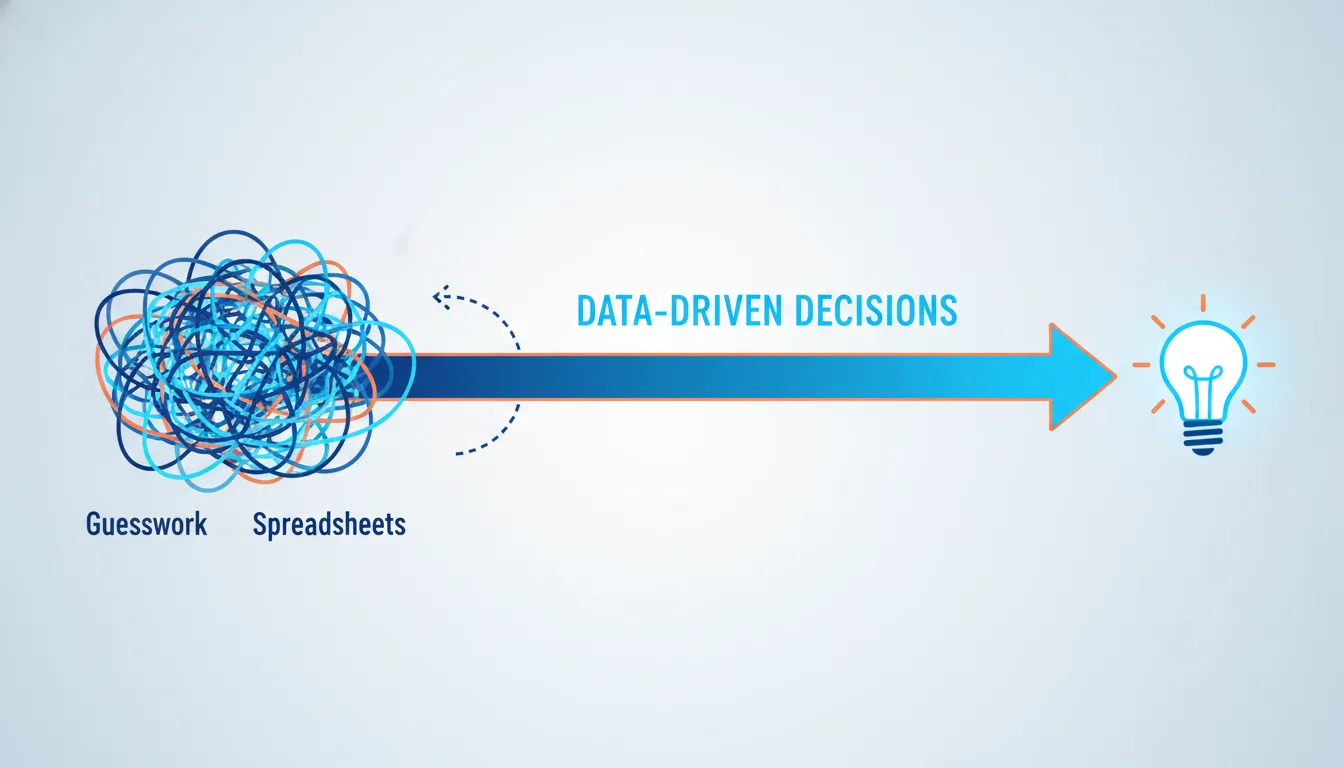
Appark.ai is a professional app data analysis platform that transforms App Store Keyword Research from a guessing game into a precise tracking science. By monitoring competitor charts and version updates, you can easily discover validated keywords and formulate an ASO strategy that truly drives growth.
Let’s be honest for a moment: traditional app store keyword research often feels like shooting in the dark.
You probably know the routine. You sit down with a massive spreadsheet, brainstorm words you think users might type, plug them into a tool to check search volume, and then stuff them into your metadata. Then? You wait. And wait. And often, you see absolutely no movement in your rankings or downloads.
This "spray and pray" approach is flawed because it relies on assumptions. It is a guessing game that wastes your time and stalls your growth.
But what if you didn't have to guess?
The truth is, the high-value keywords you are looking for—the ones that actually convert users into downloads—aren't hidden. They are already being used successfully by your competitors. The most effective ASO strategy isn't to "find" magical new words; it is to track the winning strategies of the market leaders.
Stop Guessing, Start Tracking.
In this guide, we are going to flip the script on app store keyword research. We will walk you through a 4-step framework that uses real market data to reverse-engineer your competitors' success. By using Appark.ai as your intelligence telescope, you won’t just see keywords; you’ll see the exact strategies that are working right now.
Step 1: Find Your Real Competitors (Not Just the Obvious Ones)
The first mistake most developers make in app store keyword research is tunnel vision. You might know your top two brand rivals, but in the App Store, you aren't just competing with apps that do exactly what you do. You are competing with any app that ranks for the keywords you want.
To find the best keyword opportunities, you need to cast a wider net. You need to map the entire market landscape.
Why Broad Competitor Discovery Matters
If you only look at the giants in your category, you will only find high-difficulty keywords that are impossible to rank for. By finding mid-tier competitors or niche players who are growing fast, you can discover "Goldilocks" keywords—terms with decent traffic but manageable competition.
Here is how to build a robust competitor list using Appark’s discovery tools.
Method 1: Map the Market with "Advanced Search"
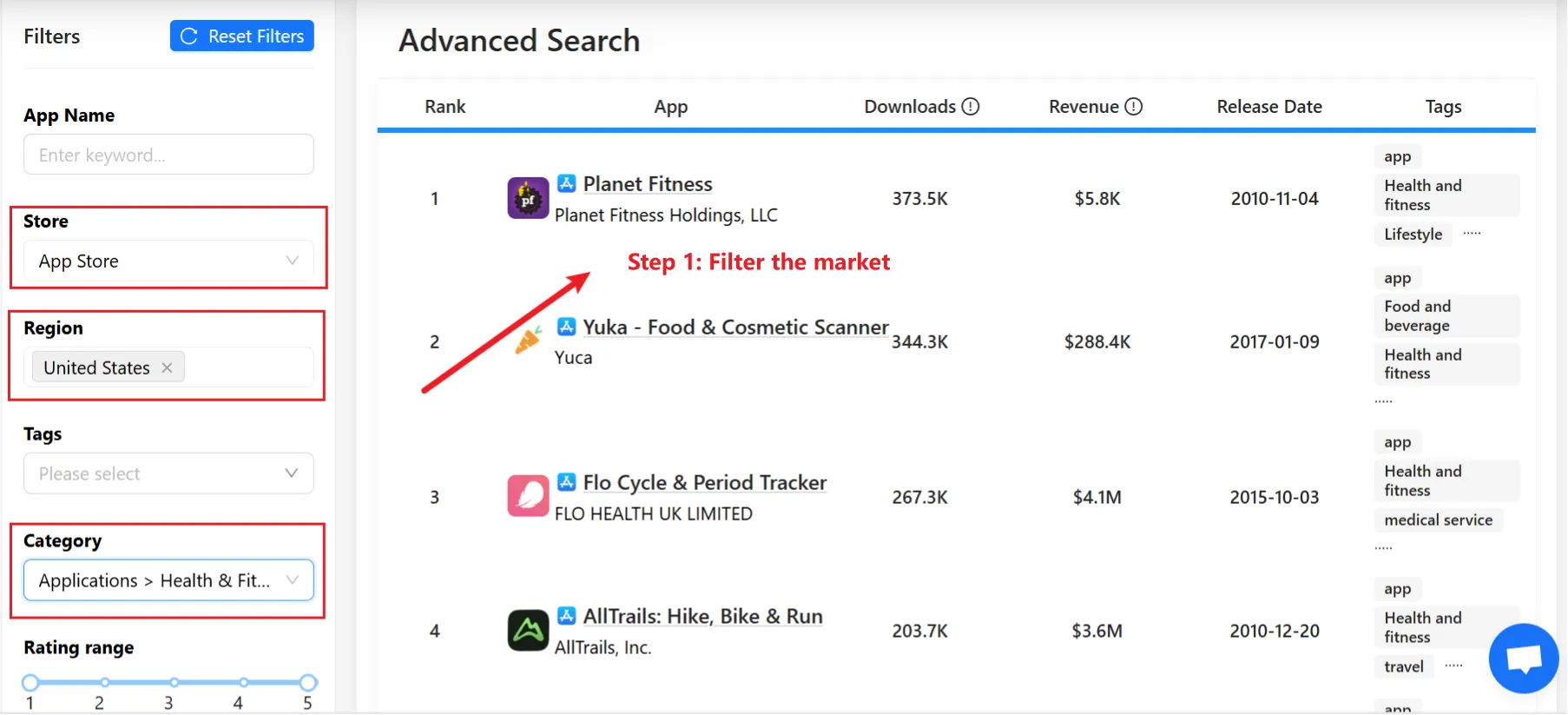
Don't start with a specific app name. Start with the market parameters. Appark’s Advanced Search feature allows you to filter the entire app ecosystem to find apps that match your target demographic.
Action: Navigate to the Advanced Search tab in Appark.
- Select Store: Choose App Store or Google Play.
- Select Country: Pick your target region (e.g., United States).
- Select Category: Choose your primary category. You might be surprised by who your real competitors are. For example, the popular outdoor app AllTrails is actually categorized under Health & Fitness, putting it in direct competition with gym and diet apps for user screen time.
This gives you a bird's-eye view of the landscape. Look for apps that aren't famous brands but are sitting comfortably in the top 50-100 rankings. These are often the smartest ASO players.
Method 2: Discover Direct Rivals via "Competitor Apps"
Once you have identified a few apps from the Advanced Search, it’s time to see who Apple or Google thinks is related to them. This is a powerful hack because it leverages the store's own algorithm.
Action: Click on a known competitor to open their "View App Detail" page. Scroll down to the system-recommended "Competitor Apps" list.
These are apps that the store’s algorithm deems highly relevant to the one you are viewing. If the algorithm links them, they likely share high-value keywords. Add these to your list immediately.
Method 3: Analyze "Category & Tags" for Niche Players
Finally, dig into the specific metadata tags. Apps often use tags to define their niche (e.g., "Intermittent Fasting" rather than just "Diet").
Action: On the app detail page, examine the Category & Tags section. Click on specific tags to see other apps sharing that label. This helps you understand how an app positions itself and reveals niche competitors that generic searches might miss.
By the end of Step 1, you should have a list of 15-20 solid competitors, ranging from market leaders to agile niche players.
Step 2: Set Up a Live Monitoring Dashboard to Track Their Every Move
Now that you have your targets, you need to set up your surveillance. Traditional app store keyword research is a static snapshot, but the App Store is dynamic. Rankings change daily.
The core principle here is simple: A competitor's update followed by a rank change is the strongest ASO signal you can get.
If a competitor updates their metadata today, and their downloads spike next week, whatever they did worked. You need a system that alerts you to these events the moment they happen.
How to Use Appark’s “Monitoring” as Your ASO Command Center
Appark’s Monitoring feature is designed to be your set-and-forget intelligence system.
Action: Take the 5-10 most relevant competitors you identified in Step 1 and add them to your Monitoring list in Appark.
Crucial Setup Step: In the Monitoring Settings for each app, ensure you check the boxes for:
- "New version updates"
- "Chart fluctuations"
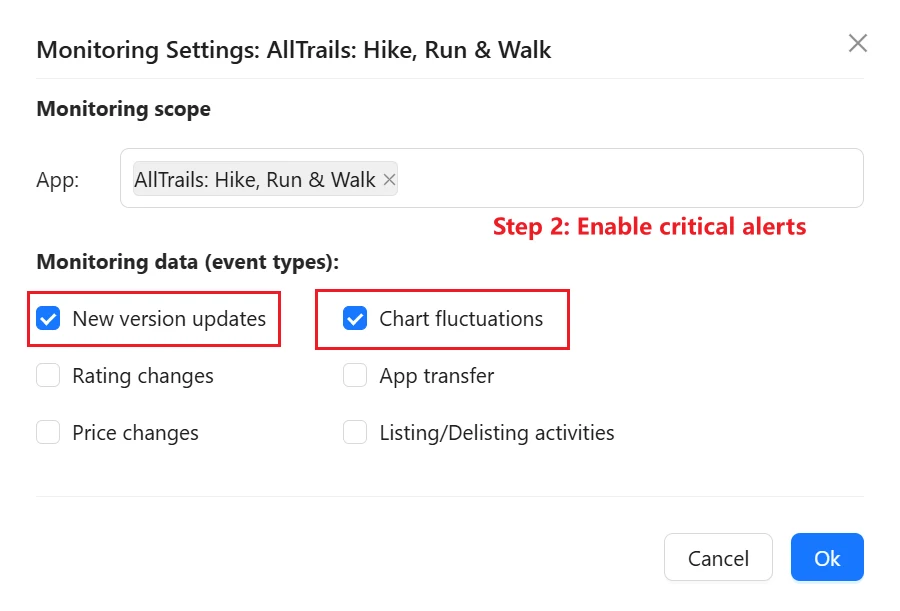
By doing this, you are no longer manually checking the store. You are building a passive radar system. When a competitor makes a move—whether they change their title, subtitle, or description—Appark will log it. This transforms your workflow from reactive guessing to proactive tracking.
Step 3: Reverse-Engineer Their Strategy: The Two-Step Analysis
This is where the magic happens. This step separates the amateurs from the pros in mobile app competitor analysis.
Most people see a competitor update their app and think, "Oh, they released a new version." You need to think, "Did this new version contain a keyword change that boosted their revenue?"
We are going to move from correlation to causation by connecting two specific data points within Appark.
How to Pinpoint Winning Strategies with Appark
To validate a keyword strategy, you need to link the "When" (the update) with the "What" (the result).
Action 1: Identify the "When" in your "Monitoring" feed
Check your Monitoring dashboard regularly. Look for "New version update" alerts. For example, we were tracking AllTrails, a major player in the outdoor activity space. We noticed in our Appark monitoring feed that they pushed a significant update around the beginning of June 2025.
Looking at their Change Log, the May update was minor ("Minor bug fixes"). But the June update was a major strategic launch. Their own description announced: "New! Explore to the fullest with AllTrails Peak...our newest premium membership."
They didn't just fix bugs; they launched a brand-new, higher-tier monetization level specifically designed for advanced users. Note down this date: Early June 2025.
Action 2: Analyze the "What" in the "Competitor comparison trend chart"
Now, you need to see if that major update mattered. Did it drive new user acquisition?
Open the Competitor comparison trend chart in Appark. Add AllTrails to the chart. Look specifically at the Downloads trend line immediately following early June.
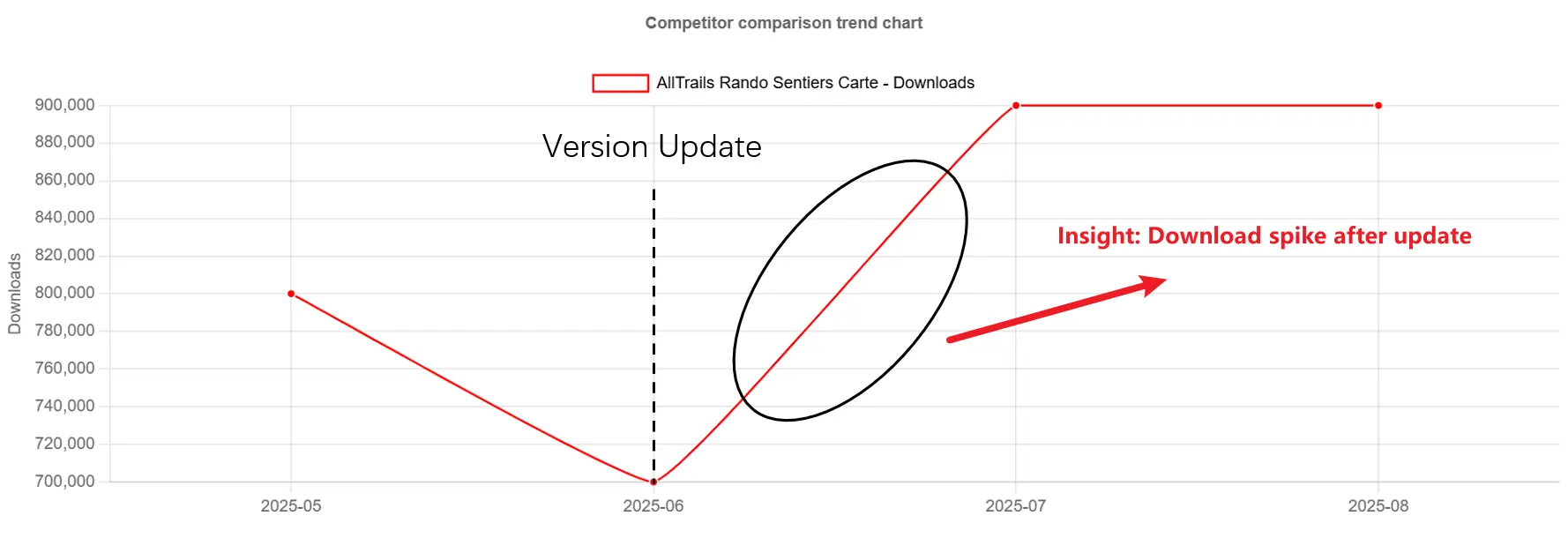
The Insight:
- Scenario A: The trend line stays flat. Conclusion: The new feature was not a major driver for new downloads.
- Scenario B: You see a dramatic spike and a new, elevated plateau for downloads. Conclusion: You have struck gold.
As the chart clearly shows, after the June update, AllTrails' downloads skyrocketed from ~700,000 to ~900,000 and stayed there. This provides data-backed proof that their new premium feature launch was a massive success in attracting new users. You didn't guess it; you observed a real-world market event and its direct consequence.
Step 4: Build Your High-Confidence Keyword List (From Data to Decision)
You have identified competitors, set up monitoring, and verified which updates led to growth. Now, it is time to synthesize this into your own app store keyword research strategy.
Synthesizing Your Tracking Data
Don't just copy your competitors blindly. Instead, build a "High-Confidence Keyword Backlog."
Following our AllTrails example, your entry in this document wouldn't just be a keyword; it would be a strategic insight:
- Insight: A major feature launch around "premium membership" and "trail planning" led to a massive download spike.
- Deduced Keyword Cluster: "trail planning app", "hiking route planner", "offline trail maps".
- Action: Prioritize these user-intent-driven keywords over generic terms.
Prioritizing Keywords and Deducing Intent
Prioritize keywords based on the observed success of multiple competitors. But with our AllTrails case, we can go deeper by deconstructing their go-to-market language.
AllTrails' own description of their new AllTrails Peak feature tells us everything. They are targeting users who want to:
- "Chart your own course"
- "plan ahead for conditions"
- "explore popular trails with heatmaps"
- And crucially, do all of this with the benefits of their existing
AllTrails Plustier, which includes "offline maps" and "wrong-turn alerts".
This isn't just about simple tracking anymore. They are targeting high-intent users searching for advanced planning and safety features. Your High-Confidence Keyword Backlog, now informed by direct evidence, becomes far more precise:
- Primary Keyword Cluster: "trail planning app", "hiking route planner", "create custom hiking routes"
- Feature-Driven Keywords: "offline trail maps", "hiking app with wrong-turn alert", "trail heatmaps"
- Competitor: AllTrails
- Result: Major download spike in June 2025, validating that a premium planning and safety toolset is a massive driver for user acquisition.
This isn't just a keyword list. It's a validated product strategy.
The Appark Loop
This process isn't a one-time task. It is a cycle that creates a sustainable growth engine for your app:
- Data Presentation: Use Appark charts to visualize the market.
- Insight Generation: Spot the trends where updates equal growth.
- Action: Update your own keywords based on these proven winners.
By continuously running this loop, your ASO strategy becomes agile. You aren't relying on search volume estimates from two years ago; you are reacting to what users are searching for today.
Conclusion: Your ASO Strategy is No Longer a Guessing Game
For too long, app store keyword research has been mystified—treated as a dark art where you throw words at a wall and hope they stick.
It doesn't have to be that way.
The blueprint we’ve outlined here—Stop Guessing, Start Tracking—removes the uncertainty. By shifting your focus from abstract search volumes to concrete competitor actions, you gain a competitive edge that spreadsheets can't provide. You are leveraging the millions of dollars your competitors are spending on testing, and you are reaping the rewards.
With Appark.ai, you have the tools to execute this strategy effortlessly. From the initial market sweep with Advanced Search to the granular verification of the Trend Charts, Appark gives you the vision to navigate the crowded App Store.
Don't let another update go to waste. Start treating your ASO like the data science it is.
Just as we saw with AllTrails, one successful update—driven by the right market insight—can change your growth trajectory overnight. The data is out there. It's time to start tracking it.
Start Tracking Your Competitors for Free(No credit card required)
Frequently Asked Questions (FAQ)
1. What is app store keyword research (ASO)?App Store Optimization (ASO) keyword research is the process of identifying and selecting specific words and phrases that potential users type into the App Store or Google Play search bar. The goal is to include these keywords in your app's title, subtitle, and description to improve visibility and drive organic downloads.
2. How do I find my app's competitors' keywords? You cannot see a competitor's private keyword field (in iOS), but you can analyze their public metadata (Title, Subtitle). Using a tool like Appark.ai, you can track changes in their text and correlate those changes with rankings updates to deduce which keywords they are targeting and which ones are driving their growth.
3. What makes a keyword "good" for the App Store? A "good" keyword has a balance of three factors: Relevance (it accurately describes your app), Search Volume (people are actually searching for it), and Difficulty (you have a realistic chance of ranking for it). Our competitor-tracking method adds a fourth factor: Proven Conversion (competitors are gaining downloads using it).
4. How often should I update my app store keywords? The App Store is dynamic. We recommend reviewing your keyword performance every 4-6 weeks. However, using Appark’s Monitoring feature, you should be watching competitors weekly. If a major competitor makes a successful move, you may need to react sooner.
5. How can Appark help with my keyword research? Appark removes the guesswork. It helps you discover hidden competitors via "Advanced Search," alerts you to their updates via "Monitoring," and helps you verify the effectiveness of their keywords using "Competitor comparison trend charts." This allows you to build a strategy based on data, not assumptions.